What Are the Limitations of Current AI Video Generation?
 RoboNeo TeamJuly 10, 2026
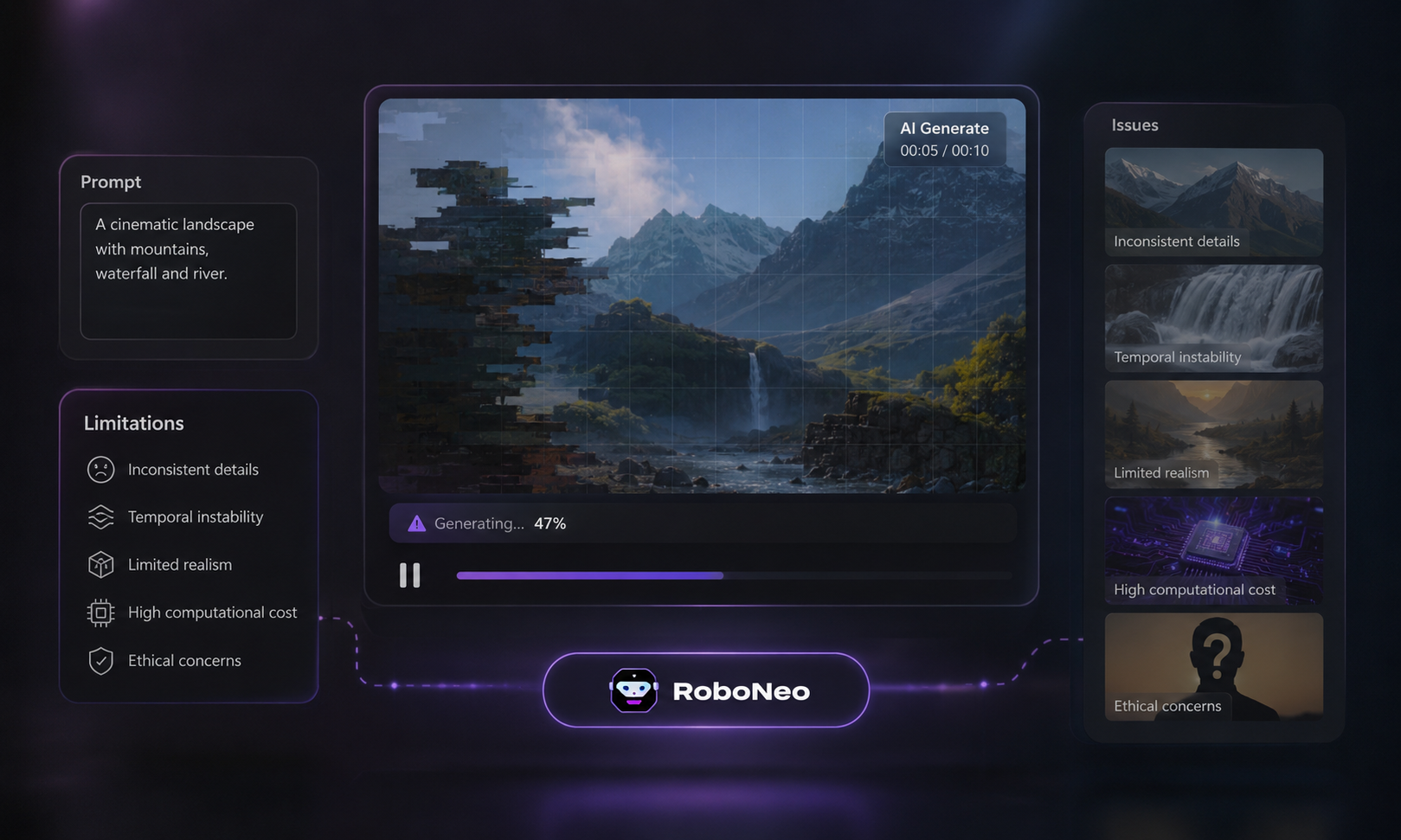
AI video generation is getting better fast, but it still has clear limits. It can speed up content creation for ads, social posts, short dramas, and product videos, but it still needs human review.
If you have ever asked what are the limitations of current AI video generation technology, the short answer is simple: current tools can still struggle with motion, consistency, lip sync, audio, text, branding, and commercial-use risks. Knowing these limits makes it much easier to plan better content and avoid weak results.
What Is AI Video Generation Technology?
Before getting into the problems, it helps to define what is AI video and what this technology actually does.
AI video generation technology uses text prompts, reference images, or existing media to create short video clips. With an AI video generator, creators can describe the scene, action, visual style, or camera movement they want, then let the model turn that input into motion.
AI video can be used for social content, ad creatives, short dramas, and quick concept testing. Still, even with better tools, the final output usually needs review and editing before it is ready to publish.
Main Limitations of AI Video Generation Technology
AI video can look impressive at first, but the real limitations usually show up in the details.
1. Unstable Faces, Hands, and Body Movement
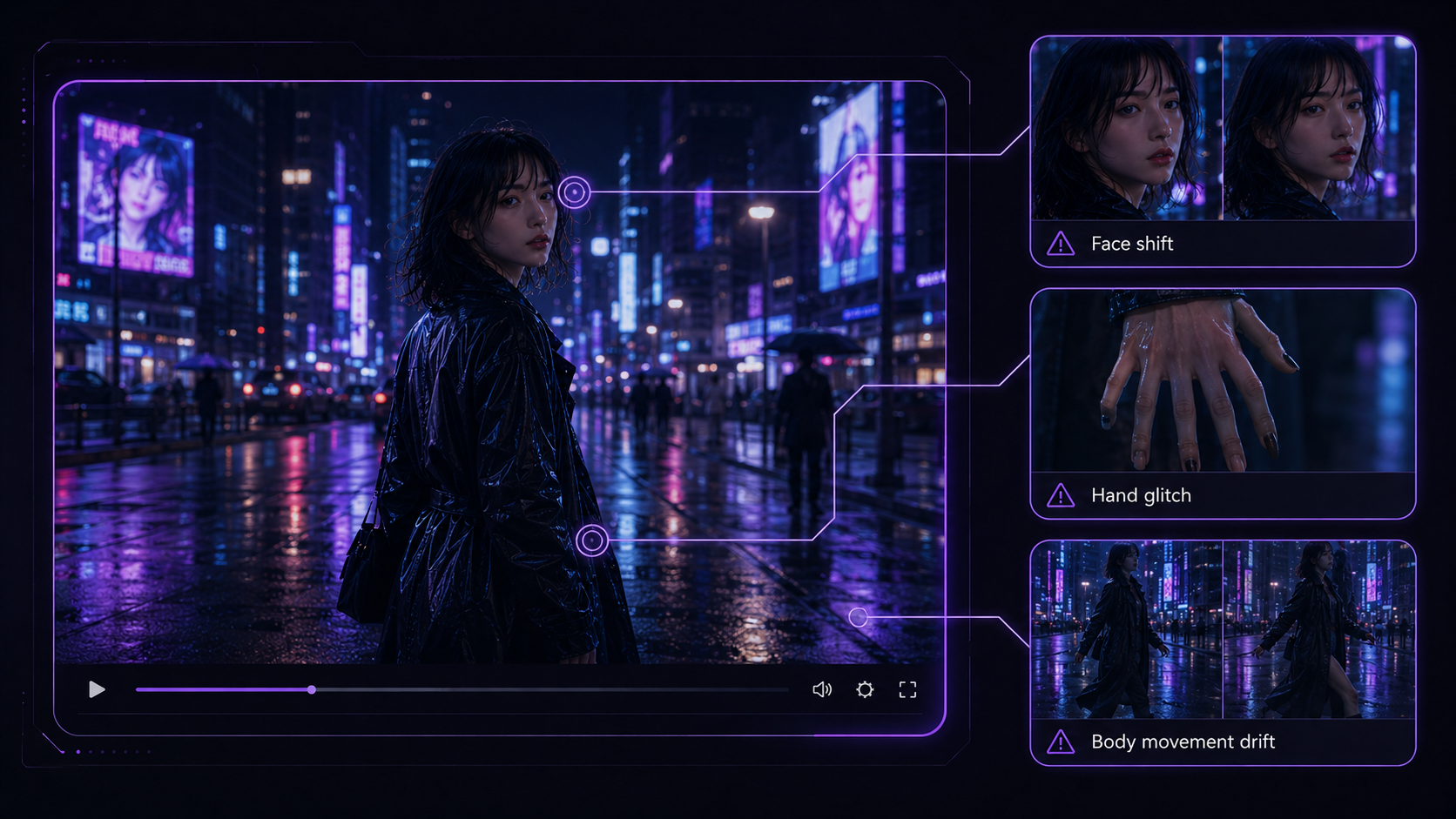
One of the biggest limits of AI generated video is unstable human detail. A face may look fine in one frame and slightly different in the next. Hands may have extra fingers, and body movement can look stiff or unnatural.
These problems are easier to spot in close-ups, emotional scenes, walking shots, or any video where the same character needs to stay visually consistent.
2. Short Video Length and Scene Continuity Issues
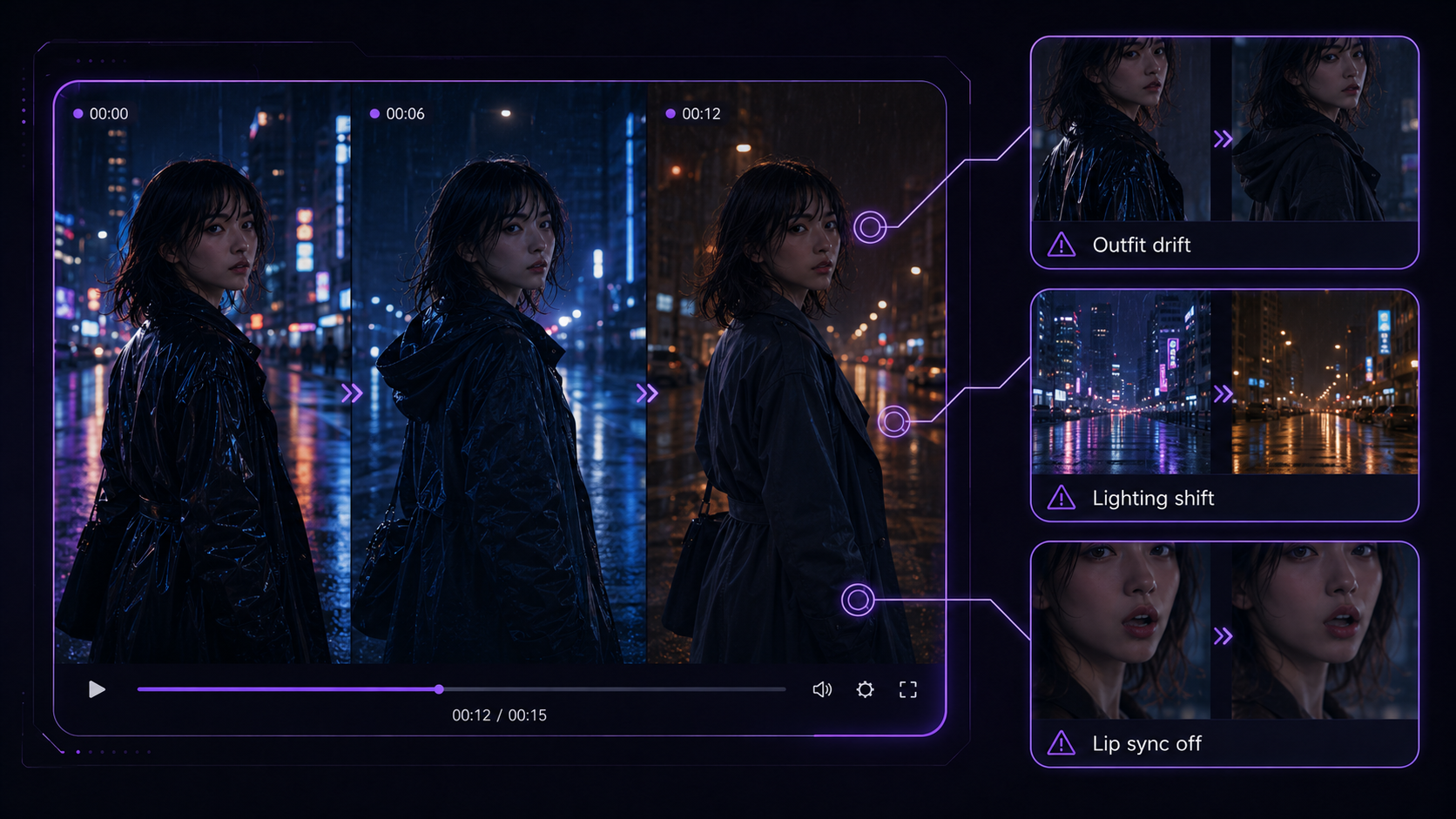
Most AI video tools still work better with short clips than long scenes. Once a video gets longer, it becomes harder to keep the same character, outfit, lighting, and background consistent from shot to shot.
Mouth movement may not match the voice, timing can feel slightly off, or the audio may not fit the mood. Talking-head videos, short dramas, and AI ads need a close review—movement and timing can shift between clips even when motion control is strong.
3. Text, Logos, and Fine Details Can Look Wrong
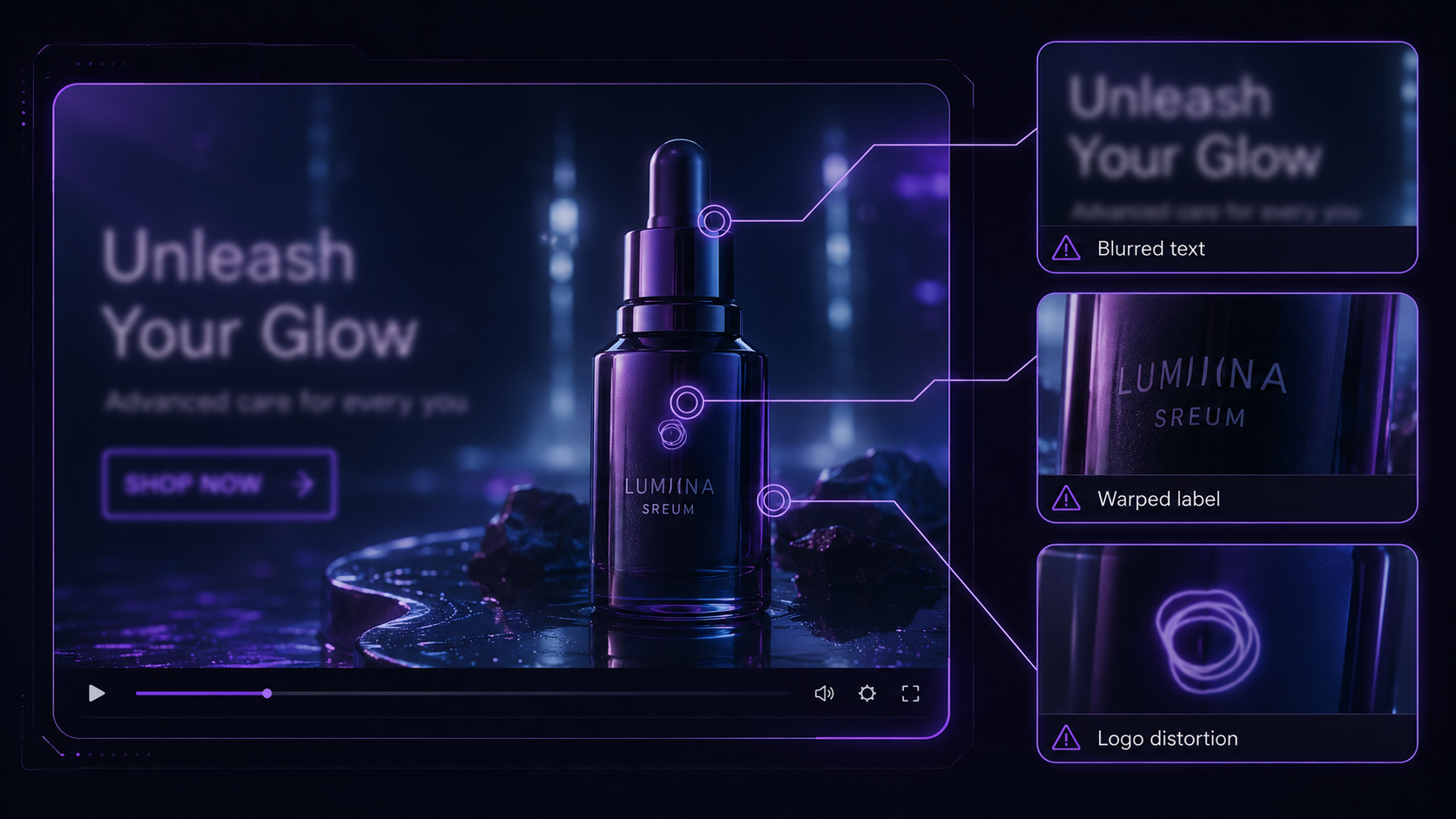
Small details are another weak spot. On-screen text often looks blurry, logos can warp, and product labels may be wrong. This matters most for brand videos. If your clip includes subtitles, a call-to-action, or product packaging, review it carefully before you publish. Rough frames can sometimes be cleaned up in an image editor before the final edit—but generation alone rarely nails fine detail.
4. Copyright, Privacy, and Commercial Use Risks
AI video also raises legal questions. If a clip uses a real person’s face or voice, you need clear likeness and usage rights before you publish.
For commercial work, always review:
Licensing for the AI tool and your final video
Copyright risk around characters, styles, music, or brand assets
Data security when uploading client files or unreleased products
How to Make an AI Generated Video Despite These Limits
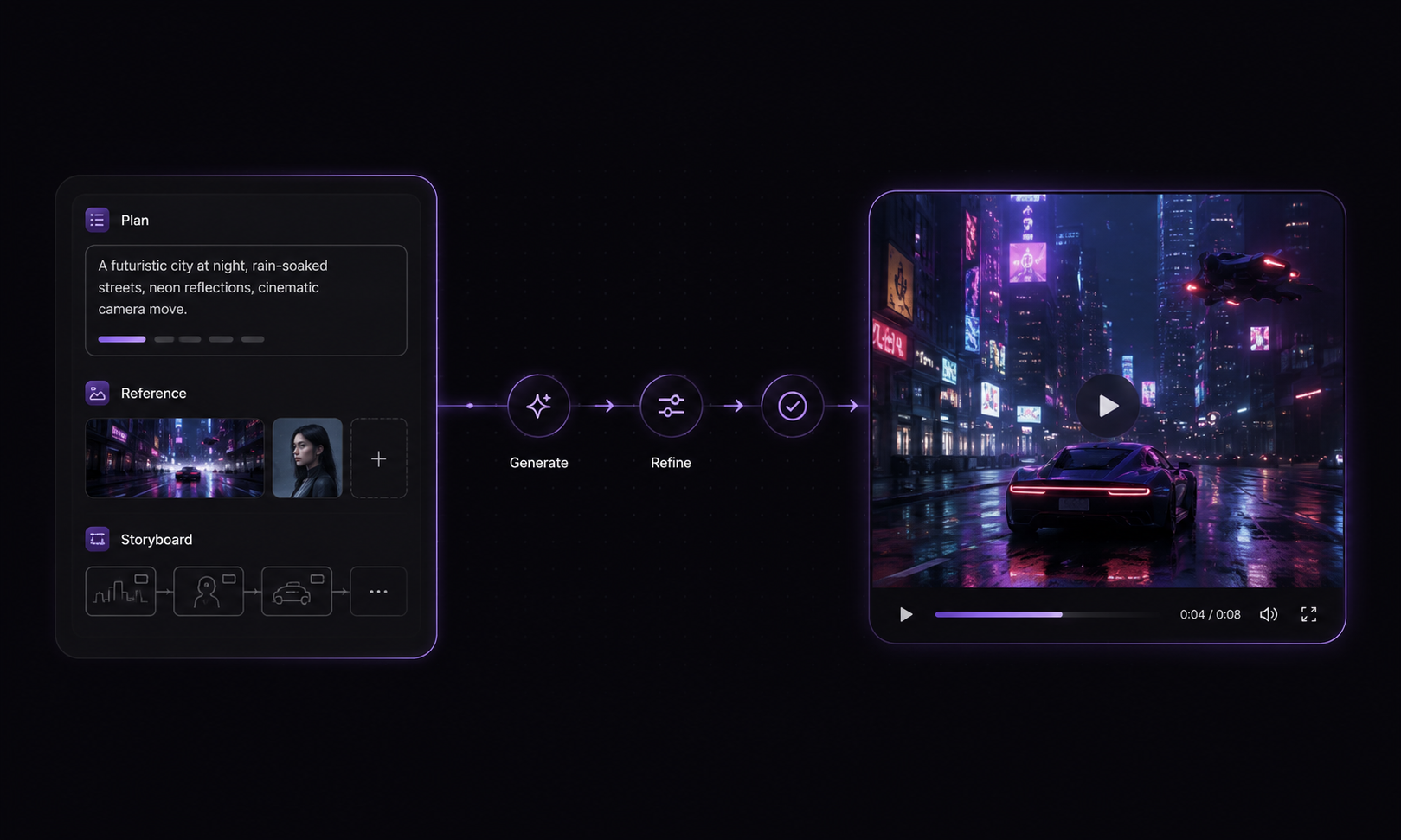
1. Start with a Short and Simple Video Idea
Start small. One scene, one action, and one clear goal are much easier to control than a long story with multiple characters and locations.
A product reveal, a short ad hook, or a single character moment usually works better than a full complex sequence.
2. Start with a Short and Simple Video Idea
Start small. One scene, one action, and one clear goal are much easier to control than a long story with multiple characters and locations.
A product reveal, a short ad hook, or a single character moment usually works better than a full complex sequence.
3. Use Clear Prompts and Reference Images
Good prompts make a big difference. A prompt should explain the subject, setting, action, mood, and camera style as clearly as possible.
Using reference pictures helps a lot. They give the system a clear visual blueprint for the character, product, color palette, or general vibe. When you need the same subject to pop up across multiple shots, a reference image to video approach is usually way more reliable than starting every single clip from a blank prompt.
4. Generate Clips Scene by Scene
Instead of trying to create a full video in one shot, break it into smaller clips. That usually leads to cleaner results and fewer continuity problems.
For example, you can create:
an opening shot
a product or subject shot
a character shot
a transition shot
a final CTA shot
This approach also makes revisions easier because you only need to fix the weak clip instead of rebuilding the whole video.
4. Review and Fix Strange Details Before Publishing
Before publishing, review the output closely. AI mistakes are often small, but they can make the whole video feel less polished.
Check things like:
faces, hands, and body movement
text, logos, and product details
lip sync and audio timing
scene flow and continuity
A short review pass can catch most of the issues that make AI video look unfinished.
5. Use Editing Tools to Improve the Final Video
Editing is still a big part of the process. Even a decent AI output often needs pacing fixes, better transitions, cleaner captions, and stronger audio.
RoboNeo is useful here because its platform goes beyond simple generation. Its site highlights AI video tools, video editing, audio tools, and end-to-end workflow support, which can help creators move from raw clips to more polished final content.
How RoboNeo Helps Reduce AI Video Workflow Problems
AI video creation is not just about generating clips. It also needs planning, structure, and cleanup. That is where RoboNeo can fit naturally into the workflow.
1. Plan the story before you generate
RoboNeo’s script and storyboard tools turn a rough idea into shot lists with scene notes, timing, and camera direction before any clip is rendered. That makes it easier to build AI video from a script without losing pacing, setting, or character intent—especially for short dramas and episodic content.
2. Keep short-form output consistent
For social clips, ads, and short dramas, RoboNeo keeps character look, lighting, and scene style aligned across shots with reference images, multi-angle image generation, and scene-by-scene production. Shorter clips are easier to control—and RoboNeo’s workflow is built around that structure instead of one-off random generations.
3. Cut tool switching across the full pipeline
Instead of jumping between a script app, image generator, video model, audio tool, and editor, RoboNeo combines script writing, image and video generation, voiceover and music, plus cleanup like upscaling and subtitle removal in one workflow. You generate, review, and polish in the same place—fewer exports, fewer continuity breaks.
Tips to Get Better Results from AI Video Tools
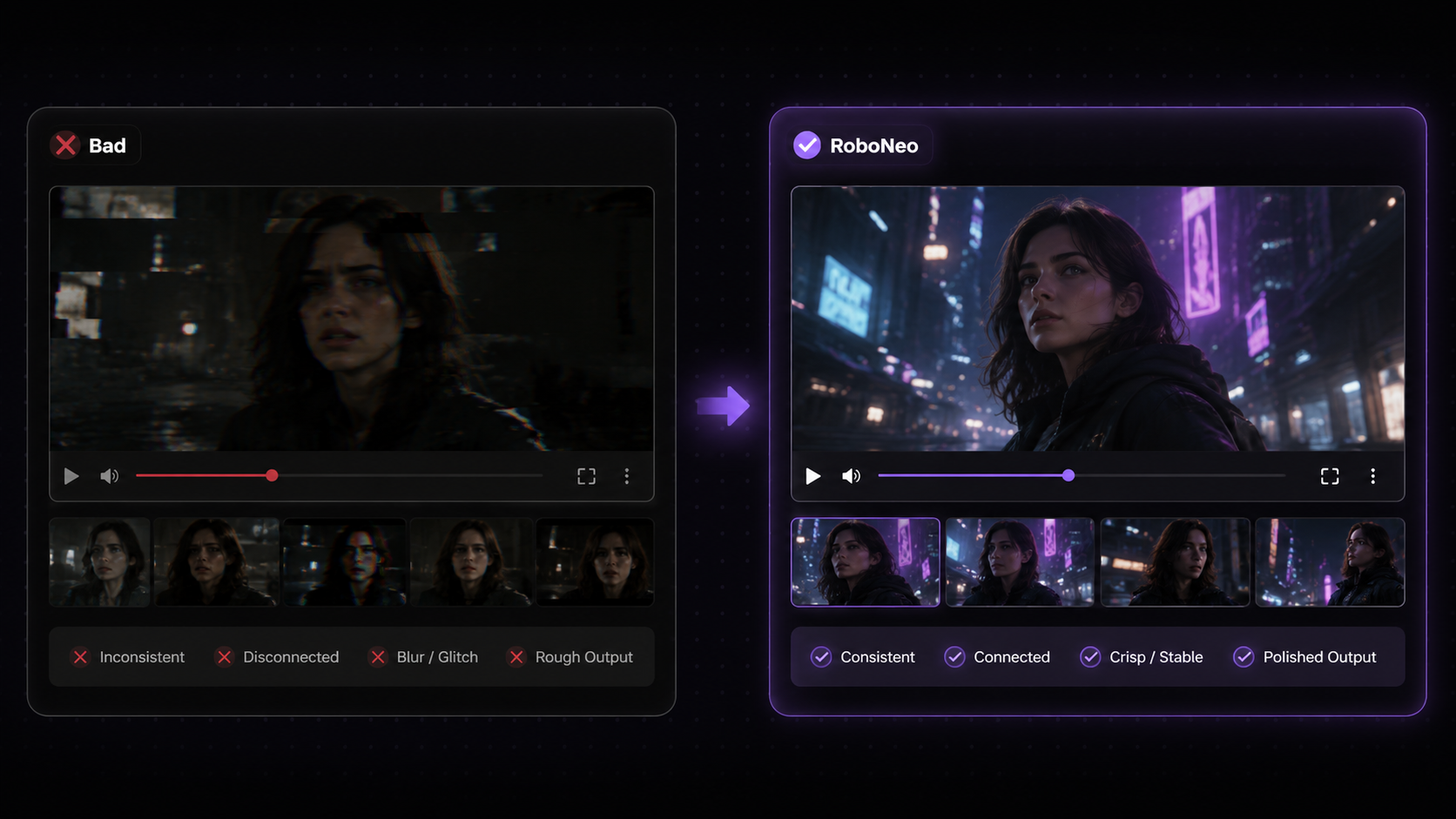
A better result usually comes from a better workflow, not just a longer prompt.
| Common Problem | Better Approach |
| Too much happening in one prompt | Use one clear action per clip |
| Character keeps changing | Use reference images and repeat key details |
| Video feels disconnected | Generate scene by scene |
| Text or logos look wrong | Add final branding in editing |
| Lip sync feels off | Review mouth movement and audio timing |
| Output feels rough | Edit pacing, captions, music, and CTA |
Frequently Asked Questions
Why do AI videos often have strange faces or hands?
Faces and hands require very precise detail across many frames. AI can generate a strong single frame, but keeping those details stable through motion is still difficult.
Can AI video generation keep the same character consistent?
It can help, but it is not always perfect. Clear prompts, reference images, and scene-by-scene generation can improve consistency, but longer videos still make this harder.
Are AI-generated videos safe for commercial use?
They can be, but creators should first check licensing, likeness rights, privacy rules, and data security. This matters most for ads, brand content, client work, and videos using real faces, voices, or protected assets.
Will AI video generation replace human video production?
Not completely. AI can speed up ideation, short-form content, drafts, and visual testing, but human input is still needed for storytelling, editing, legal review, and creative judgment.
You May Be Interested
Instagram Reel Dimensions: Size, Ratio & Resolution Guide
How to Restore Old Photos: Repair Fading and Damage
7 Best Free AI Photo Enhancer in 2026

How to Make Picture Higher Resolution: Upscaling Guide
How to Write Romantic Fiction: Tips for a Better Love Story

Runway AI Video Generator Review: Features and Pricing

How to Fix Overexposed Photos: Better Editing Tips
How to Brighten a Dark Picture Without Washing It Out
How to Remove a Watermark from a Photo: Easy Methods
How to Remove Proof from a Photo Safely and Cleanly
DPI vs PPI: Key Differences for Print and Screen

1080p vs 1440p: Which Resolution Is Better?
How to Upload HD Video to Facebook: Best Settings
What Is Frame Interpolation? How It Works and Uses
How to Make a Memorial Video: AI Tips for Meaningful Memories
Movie-Quality AI Video Prompts: Complete Guide

What Is Upscaling? Video Enhancement Explained
Photographic Noise Explained: Causes, Types, and Fixes
How to Fix Grainy Photos: Reduce Noise and Improve Quality
Can You Set Display Quality on YouTube? Settings Guide
How Do You Write Dialogue? Video Script Writing Guide
Talking Animals in Stories: Create AI Video Characters
Linear and Nonlinear Storytelling: A Guide for Video
Animatic vs. Storyboard: Key Differences and Best Uses
What Is Character Motivation? Video Storytelling Guide
What Is a Film Storyboard? Purpose, Parts, and Process
Open Ending Meaning: A Guide for Film and Video
How to Create an Anime Movie: The Complete Process
Horror Movie Ideas: 15 Scary Plots for Low-Budget Films
Movie Ideas to Make at Home: 15 Easy Beginner Films
How to Make a Product Video: Scripts, Shots, and Sharing
How to Make Realistic AI Videos: Tips and Mistakes
What Is 8K Resolution? Uses, Benefits, and 4K Comparison
PicWish Watermark Remover Review: Is It Worth Using?
How Can I Improve Video Quality? Practical Fixes

What Is 2K Resolution? Pixel Size, Uses, and Differences
What Is a Show Bible? TV Writing Guide and Template
What Is a Cliffhanger? Types, Examples, and Writing Tips
How Long Is a Short Film? A Runtime Guide for Filmmakers
How to Write a Movie Script: Steps for First-Time Writers
How Many Scenes in a Movie? A Screenwriter’s Guide
How to Write a Drama Script: 6 Clear Steps for Beginners
3 Best Background Noise Removal Apps for 2026
Vmake AI Video Watermark Remover: Tested and Reviewed
ChatGPT Script vs RoboNeo AI Script Generator
How to Enhance Sora AI Video Quality in 2026?
How to Download YouTube Videos and Remove Watermarks
Best AI Features for Enhancing UGC Video Quality in 2026
SnapTik TikTok Downloader Review: Pros, Cons and Alternative
How to Remove Watermark from Video with AI (2026 Guide)
How Long Does It Take to Write a Script? A Practical Guide
Canva AI Video Generator vs RoboNeo: Key Differences
How to Write a TV Commercial Script: Step-by-Step Guide
Character AI Alternative: 7 AI Chat Tools to Try in 2026

How to Create AI Video from Script: A Complete Guide
Best TikTok Script Generator in 2026
How to Write a Video Script: 7 Steps for Beginners
How to Write Script for Youtube Video: Complete Guide
How to Turn Long YouTube Videos into TikToks with an AI Video Clip Generator
6 Best Ai Character Generator in 2026: Tested & Compared
6 Best AI Video Generators in 2026
Best Prompt for YouTube Script in 2026
Best YouTube Script Generator: From Script Writing to Video Creation