SnapTik TikTok Downloader Review: Features and Alternatives
 RoboNeo TeamJuly 21, 2026
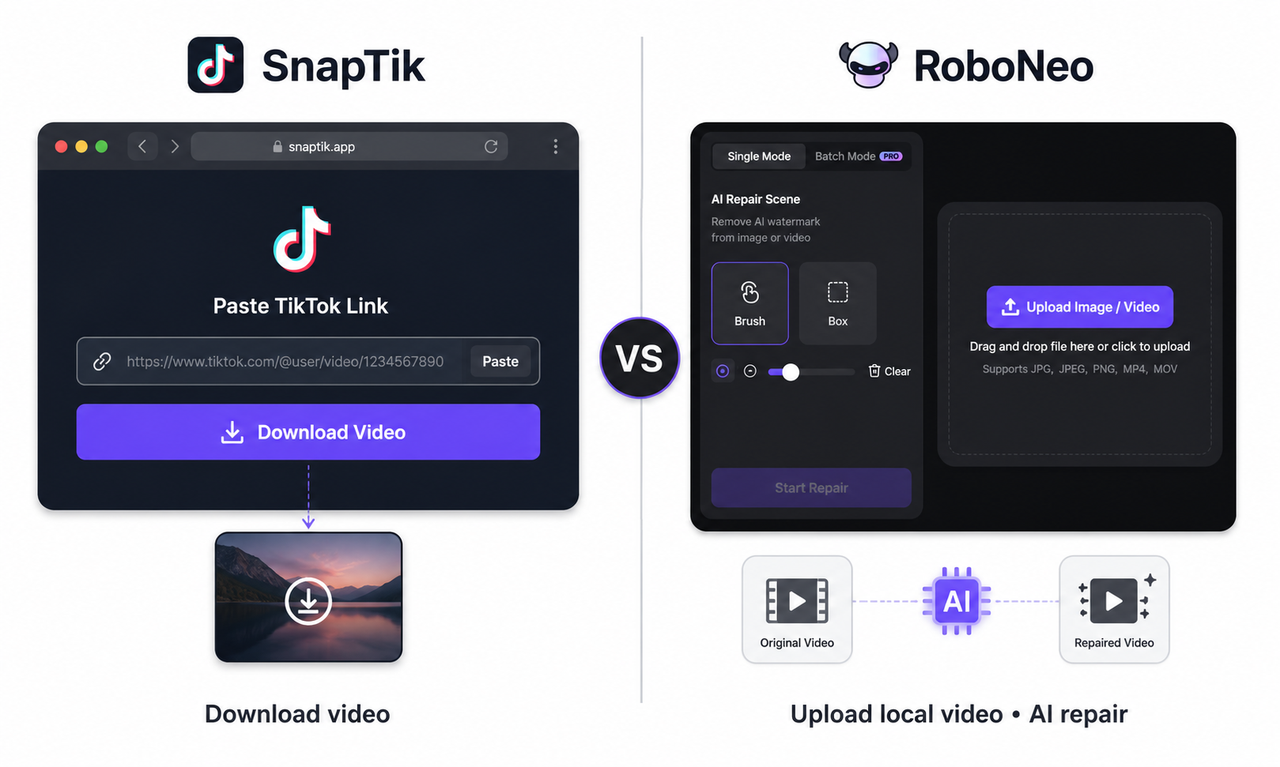 Saving a TikTok should be simple, but pop-ups, redirects, soft files, and missing audio often get in the way. SnapTik is a browser tool that downloads TikTok videos from a pasted link with no editing software required.
This review covers how SnapTik works, what you get in the file, where it falls short (ads, quality limits, privacy), and when it’s a practical way to save videos you own or have permission to download.
What Is SnapTik TikTok Downloader?
SnapTik is a third-party, browser-based TikTok downloader. Copy a public TikTok URL, paste it into SnapTik, and save an available file—usually without the usual TikTok watermark. It does not accept local uploads or remove watermarks already baked into a saved clip, and it is not affiliated with TikTok or ByteDance.
Use it for your own posts, personal backups, or footage you have permission to reuse. A public link alone does not grant reposting or commercial rights.
SnapTik TikTok Downloader Pros and Cons
The points below refer to the SnapTik.app web downloader. Similarly named mobile apps may use different pricing, advertising, or download rules.
SnapTik TikTok Downloader Pros
-
No account or TikTok login is required. A copied TikTok link is enough to start the download, and the web version works through a browser on phones, tablets, and computers. This is convenient when the original copy of your own TikTok is no longer in your camera roll.
-
Watermark-free downloads are available at no charge. SnapTik states that its standard downloader is free, places no SnapTik watermark on the saved file, and does not set a download limit. The service is supported by advertising rather than a subscription.
-
Video quality depends on the best file SnapTik can retrieve. When a Full HD or higher-resolution version is available from the source, the site may display a high-quality download link. This helps preserve the available TikTok quality, although it does not enhance a low-resolution original.
There is also no software installation requirement. For someone moving between a work laptop and a phone, the same copy-and-paste workflow can be used on either device.
SnapTik TikTok Downloader Cons
-
The free experience is ad-supported. No payment is required, but the page may feel busier than a paid downloader because advertising helps fund the service.
-
Quality controls are not fully manual. SnapTik may provide a high-resolution link when one is detected, but users are not guaranteed a fixed menu of 720p, 1080p, Full HD, or 4K options for every video. The available output is tied to the source file that TikTok provides.
-
The standard free downloader handles videos one link at a time. It does not download an entire profile or hashtag collection in one job. SnapTik offers a separate paid Pro service for bulk profile downloads, so that workflow is not part of the regular free tool.
Is It Legal to Download TikTok Videos With SnapTik?
It depends on the content and how you use it. Downloading your own video or a clip you have permission to use is generally acceptable. Saving or reposting someone else’s copyrighted video without authorization may infringe their rights. SnapTik also limits downloads to personal, non-commercial use and makes users responsible for obtaining the necessary permission.
How to Download TikTok Videos With SnapTik
SnapTik only needs the TikTok post URL. There is no account sign-in or manual video upload, though the method should be limited to public content you created or have permission to save.
Step 1: Open the TikTok Video
Find the post in the TikTok app or open it in a web browser. A quick playback helps confirm that it is the correct clip, especially when an account contains several similar edits, drafts, or reposts.
This can be useful when the original file from your own account is no longer available in your camera roll.
Step 2: Copy the TikTok Video Link
On a phone, the URL is available through Share > Copy Link. Desktop users can copy the browser address or select the same option from TikTok’s sharing menu.
Once copied, the link stays on the device clipboard until it is pasted into SnapTik.
Step 3: Paste the Link Into SnapTik
With the URL ready, go to SnapTik and place it in the download box. Select Download, and the site will retrieve the available file from the TikTok post.
Because the process runs in a browser, there is no need to install editing software or transfer the video from another device first.
Step 4: Select a Download Option
After processing, one or more download buttons may appear, sometimes labeled by server. A higher-quality option may also be shown when SnapTik finds a Full HD source.
Not every post comes with a fixed choice of 720p, 1080p, or 4K. The final quality depends on the version available from TikTok, and SnapTik cannot restore detail that is missing from a blurry original.
Step 5: Save and Check the Video
The file usually goes to the browser’s Downloads folder on a computer or Android device. On an iPhone, Safari may place it in the download manager or Files app; from there, it can be moved to Photos through Share > Save Video.
Before using the clip in another project, play it through once. Check the audio, duration, image quality, and ending to make sure the download completed properly.
An Alternative for Existing Videos With Watermarks
SnapTik needs a public TikTok link. If your only copy is already on your phone, in a chat, or exported with a username/logo baked in, the file needs to be edited rather than downloaded again.
What Is RoboNeo AI Watermark Remover?
RoboNeo AI Watermark Remover is built for existing image and video files. Its current upload page accepts JPG, JPEG, and PNG images, as well as MP4 and MOV videos. Users can upload the saved file and identify a logo, username, text overlay, watermark, or another unwanted element for removal.
The process differs from a TikTok downloader. RoboNeo does not search for or retrieve a clean copy of the original post. Instead, its AI examines the visible content around the selected area, including nearby pixels, textures, movement, and lighting, then attempts to rebuild what the overlay was covering across the affected frames.
A common case would be an older product clip that exists only as an MP4 with a previous brand logo in the corner. Another might be a creator’s own TikTok draft that was saved with a username across changing scenery.
SnapTik vs RoboNeo: Which One Should You Use?
SnapTik and RoboNeo address different parts of the workflow. SnapTik retrieves a public TikTok video from its link, while RoboNeo is meant for editing a video file that already contains a logo, text overlay, or watermark. They are better viewed as separate tools rather than direct substitutes.
| Comparison | SnapTik | RoboNeo |
| Primary Task | Download TikTok videos from a public link | Edit existing images or videos and remove unwanted elements |
| Input Method | Paste a TikTok URL | Upload a local media file |
| Watermark Handling | Retrieves an available version without the TikTok platform watermark | Uses AI editing to remove a selected logo, text, or watermark |
| Fixed Watermarks | Not intended for editing marks already embedded in the video | Suitable when a fixed mark needs to be removed from an existing file |
| Moving or Complex Watermarks | Does not provide detailed editing controls | More relevant when the mark moves or crosses a detailed background |
| Best For | Quickly saving authorized TikTok videos | Repairing or editing footage already stored on your device |
A public TikTok link and a simple download are the best reasons to pick SnapTik: paste the URL and save the available watermark-free file—no editor needed.
Once the watermark is already in a local file (fixed logo, moving username, or text over a person/detailed scene), you need editing, not another download. RoboNeo fits that job better.
-
Download a TikTok → SnapTik
-
Edit an existing video → RoboNeo
-
Moving watermark or complex background → AI repair gives more control than a link downloader
Conclusion
SnapTik is a fast way to save public TikToks without the usual platform watermark. The link-based flow works on common devices and suits your own posts, personal backups, or clips you have permission to reuse.
It only works with accessible TikTok links—it can’t edit local files or remove embedded logos/text already on the clip. Use it for straightforward downloads, not broader cleanup. Before reposting or commercial use, get the creator’s permission.
FAQ
Is the SnapTik app safe to use?
SnapTik is generally safer to use through its official website because it does not require a TikTok login or software installation, and its privacy policy says visitors can use the service anonymously. However, several unrelated mobile apps use the SnapTik name, so check the developer, permissions, reviews, and in-app purchases before installing one.
Does SnapTik download TikTok videos without a watermark?
Paste a public TikTok video link into SnapTik, and it will provide a downloadable version without the TikTok watermark when available. It does not remove watermarks from videos already saved on your device
Does SnapTik cost money?
SnapTik’s standard TikTok downloader is free and supported by ads. A paid SnapTik Pro plan is only needed for bulk downloads, such as saving multiple videos from one profile.
Does SnapTik Work on iPhone and Android?
Yes. SnapTik works in mobile browsers on both iPhone and Android, so you can copy a TikTok link, paste it into the site, and save the available video. Android users can also use SnapTik’s app, while iPhone users generally access the service through Safari or another browser.
Does SnapTik reduce video quality?
SnapTik generally preserves the best quality available from TikTok rather than intentionally reducing it. A download may still look softer when the original post was already compressed or no higher-resolution source is available.
You May Be Interested
6 Best AI Video Generators in 2026

Best TikTok Script Generator in 2026
Canva AI Cartoon Generator vs RoboNeo: 2026 Guide