
How to Create Realistic Micro-Expressions with AI
 RoboNeo TeamJuly 28, 2026
Start From A Prompt Sample
Upload a single photo, copy the micro expression prompt below, and get a cinematic, emotionally-layered video back.
Most AI-generated videos still feel "off". It's not because the face is wrong, it's because the expression feels unnatural and disconnected. Real emotion isn't one static face; it's a sequence of tiny, involuntary signals: a lip that quivers before it breaks, eyes that dart away and come back. That's a micro expression — and it's the difference between an AI clip that looks generated and one that looks acted.
The good news is you don't need a facial animation rig to get this. You need the right micro expression prompt. Whether you're using an AI expression changer or a full facial expression changer tool, the technique is the same: you're not describing an emotion, you're directing a performance.
How to Create It
A weak prompt says "a sad woman crying." A strong micro expression prompt is written like a film script, not a list of adjectives. It follows six layers:
Identity/scene lock state upfront what must stay frozen (face, hair, outfit, background, framing) so the model only edits performance, not identity.
Trigger one line for what caused the reaction, so it reads as motivated instead of generic.
Timeline (beginning → middle → end) split the reaction into stages, each following physical signal → internal state → micro-cue, instead of naming the emotion directly.
Restraint rules — repeat "do not overreact" cues at the end of each stage, not just once at the end, to stop the model from sliding into theatrical acting.
Cinematography tag — a separate style anchor (lighting, lens, texture, camera feel) placed at the end of the descriptive block.
Negative constraints — a dedicated closing block covering three risk types: identity/scene drift, overacting, and AI-render artifacts.
Skip the timeline and you get one flat expression. Skip the restraint rules and the model overacts. Skip the negative constraints and you get glue-like tears and drifting eyes.
Sample: RoboNeo Prompt
Copy the prompt below to create the same micro expression in RoboNeo.
Generate a delicate, realistic, cinematic micro expression video based on
the uploaded image.
Keep the person's identity, facial feature proportions, face shape,
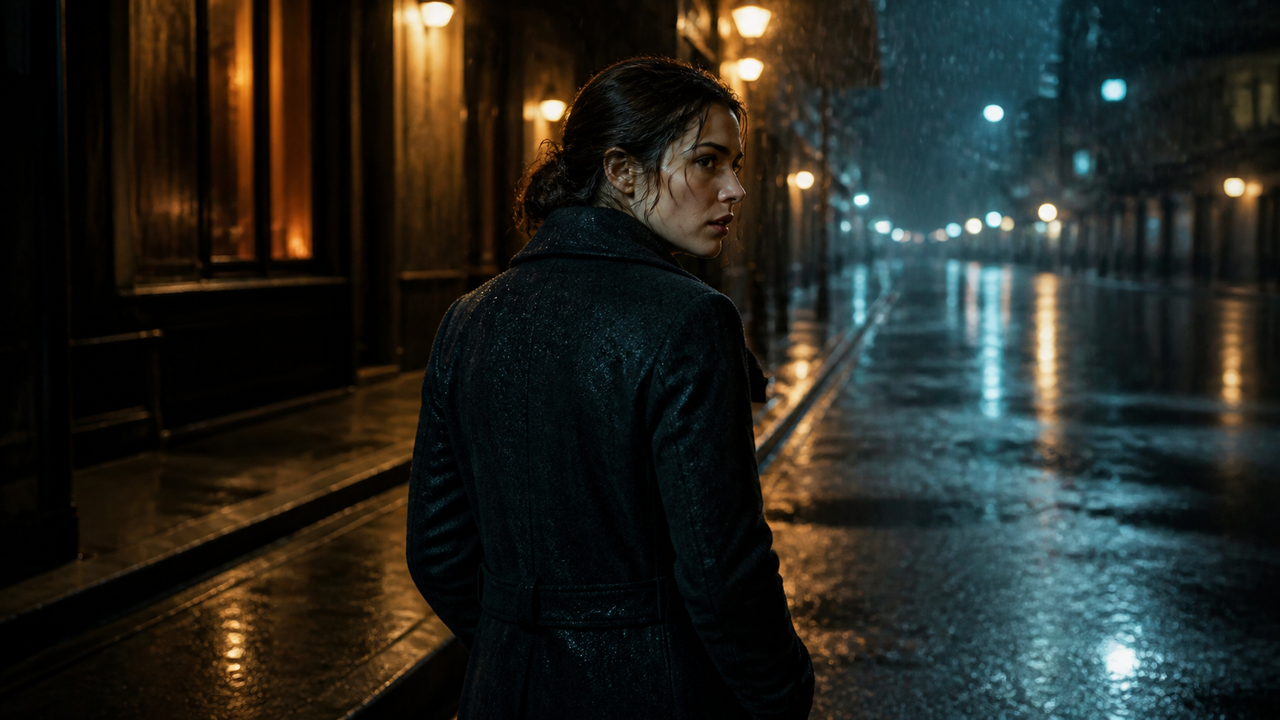
hairstyle, messy wet blonde hair texture, makeup, clothing, nighttime
street background, red blurred car lights, and close-up headshot
composition completely unchanged. Keep the original focal length and
camera position. Do not zoom in or zoom out.
Only allow a very subtle handheld breathing-like camera movement.

The scene takes place on a late-night street. She has just heard
extremely bad, unacceptable news from a phone call or from someone
beside her. She does not immediately burst into tears. Instead, she
briefly goes blank, as if the news has physically hit her. Her gaze
stays near the camera but does not truly focus.

At the beginning of the video, her lips are slightly parted, her chest
rises and falls noticeably, and she begins taking large breaths, as if
she is trying to pull air into her lungs after being shocked. Her
nostrils expand slightly, her throat makes a subtle swallowing motion,
and her lips tremble from tension. Her eyes open slightly wider than in
the original image, her pupils look wet, and her gaze shows shock,
panic, and disbelief. She seems as if she wants to speak, but only a
very faint breath comes out. The corners of her mouth twitch slightly,
as if she is quietly asking "what?" in a very soft, broken, disbelieving
tone.

Then she slowly realizes that the news is real. Her breathing changes
from fast to unstable. Her shoulders sink slightly. Her gaze gradually
loses support, shifting from shocked intensity into emptiness. She
tries to stay composed. She gently closes her eyes once, then opens
them again. Her eyes begin to redden, and tears gather along her lower
eyelids but do not fall immediately. Her chin trembles slightly. Her
lips press together, then loosen again, as if she is holding back
emotion and trying not to break down in the street.

In the middle of the video, she quietly looks toward a point beside the
camera. Her breathing becomes slower but heavier. Her facial expression
is almost still, with only her eyes changing. Finally, one tear slips
from one eye and slowly rolls down her cheek. She does not cry
dramatically or scream. She breaks down very quietly. Her gaze looks
shattered, the corners of her mouth turn slightly downward, and her
brow tightens subtly. She takes a small breath, as if trying to push
the emotion back down, but fails. A second tear follows.

At the end, she lowers her gaze for half a second, then raises her eyes
again, still keeping the original nighttime close-up composition. Her
breathing gradually becomes shallower. Her face carries the quiet
collapse of someone who has been crushed by reality. The overall
performance should be restrained, realistic, and delicate. Do not make
her cry in a theatrical way. Do not use exaggerated expressions or
large movements. Focus only on micro-expressions, breathing, eye
movement, trembling lips, falling tears, and the gradual collapse of
emotion. Cinematic realism, real skin texture, preserved facial glow
and nighttime flash photography texture, shallow depth of field, red
blurred car lights in the background, nighttime city atmosphere, subtle
handheld camera feeling, natural and believable emotion, like a
close-up breakdown scene from an independent film.

Negative constraints:
Do not change the person's identity. Do not change her facial features,
face shape, hairstyle, hair color, makeup, clothing, or scene. Do not
replace the background. Do not add any new people. Do not show a phone
or any extra props. Do not make her turn her head dramatically. Do not
zoom out. Do not make her cry or scream dramatically. Do not make her
open her mouth wide and wail. Do not make the performance feel like a
horror scene. Do not show blood, wounds, or violence. Do not make it
cartoonish. Do not over-smooth the skin. Avoid AI-looking skin, facial
deformation, drifting eyes, abnormal teeth, glue-like tears, sudden
expression changes, or flickering facial features
The Reusable Formula: Use it for your next creation
1. [Identity Lock]
2. [Trigger, one line]
3. [Timeline: Beginning (physical signal) → Middle (restraint/struggle) → End (small emotional release)]
4. [Restraint rule repeated at the end of each stage]
5. [Cinematography tag, standalone]
6. [Negative constraints, standalone, covering identity drift / overacting / render artifacts]
Conclusion
Realistic AI emotion comes from the prompt, not the model. Lock the identity, give the reaction a trigger, break it into a beginning-middle-end timeline with restraint rules at each stage, tag the cinematography once, and close with clear negative constraints; copy the sample above, swap in your own trigger and emotion, and try it in RoboNeo.
You May Be Interested
5 Best Free AI Story Generators in 2026: Tested & Ranked
ChatGPT Script vs RoboNeo AI Script Generator
Best Prompt for YouTube Script in 2026
Image to Video Girl Dancing Prompts: 20 AI Prompt Ideas
What to Tell AI to Humanize Text: Prompts That Work
Movie-Quality AI Video Prompts: Complete Guide