Best AI Video Generators for Anime Style 2026: Top Picks
 RoboNeo TeamSeptember 11, 2026
The best AI video generator for anime depends on how you want to create. RoboNeo works well for short anime videos, DomoAI is better for turning existing footage into anime, Kling AI handles character movement well, and PixVerse fits stylized social clips. Runway offers more detailed shot control, Higgsfield focuses on dynamic camera movement, while Luma AI is better suited to cinematic scenes and atmospheric environments.
Instead of choosing by output quality alone, it is more useful to look at your source material, the type of movement you need, and how much control you want over each shot.
Advantages of Making Anime Videos with AI

The best AI tools for generating anime-style video in 2026 can shorten several early production steps, especially for creators who need to test ideas quickly or produce short-form content without building a full animation pipeline.
Faster Video Production
A text description, character image, or existing video can be turned into an anime-style clip without completing frame-by-frame drawing, character rigging, or complex 3D work first.
A creator with an original character illustration could upload the image and generate a short walking shot, then test a slower movement, different camera angle, or alternate background. Several versions of the same scene can be compared before deciding which direction is worth developing further.
Existing character and environment art can also become useful starting material when you make AI videos. AI reduces the time needed to create those first versions, although facial details, clothing, hands, and background lines still need human review before the clips are used in a finished project.
Lower Production Costs
Short character clips and early concept videos do not always require a full traditional animation team. Independent creators and small studios can use AI to test a story, character, or visual direction before investing in more expensive production.
A musician planning an anime-style teaser could first generate a few character and environment shots to see whether the concept fits the song. A small game team may use the same approach to preview how a character design looks in motion before producing a full trailer.
Free trials and credits can make this early testing cheaper, but they rarely support a large number of finished shots. Long-form stories, complex action, and precise character performances can also expose common limitations of AI video generation and may still require professional animators and manual editing.
Best AI Video Generators for Anime Style in 2026
The best AI tools for generating anime-style videos in 2026 approach anime video creation in different ways. Some are stronger with text and still images, while others make more sense when the movement already exists in live-action footage.
| Generator | Best For | Creation Method | Anime Output Quality | Free Access | Main Limitation |
| RoboNeo | Short anime videos | Text and image to video | Depends on selected model | Check current credits | Character details may shift |
| DomoAI | Live action to anime | Video-to-video | Strong for style conversion | Limited testing | Flicker can appear |
| Kling AI | Character movement | Image and text to video | Strong for motion | Varies by account | Large actions may distort details |
| PixVerse | Social clips | Text and image to video | Good for stylized content | Limited free access | Weak long-scene continuity |
| Runway | Detailed shot direction | Text and image to video | High with careful prompting | Limited free use | May add realistic texture |
| Higgsfield | Dynamic camera moves | Image-based generation | Strong for dramatic shots | Check current plan | Large moves may alter characters |
| Luma AI | Cinematic scenes | Text and image to video | Strong for atmosphere | Limited access | Long character consistency |
RoboNeo — Best for Making Short Anime Videos
RoboNeo is a practical option for character clips, anime-style ads, social videos, visual concepts, and short story scenes. Users can begin with text or use an existing character or environment image to give the generation a stronger visual starting point.
For creators who already have character art, reference image-to-video can help establish the hairstyle, outfit, color palette, and overall look before the prompt focuses on movement. A scene might ask the character to turn toward the camera while the wind moves their coat and the camera slowly pushes forward.
Longer sequences are usually easier to manage as separate short shots. After generation, faces, body proportions, clothing, and background lines should be checked before the usable clips are combined.
Current input methods, supported video length, credit costs, and output settings should also be confirmed before starting a larger project.
Make Anime Videos with RoboNeo
DomoAI — Best for Turning Live Action into Anime
DomoAI is better suited to creators who already have motion they want to preserve. Rather than asking the model to invent an entire performance, the original video supplies the body movement, timing, and camera motion while the tool changes the visual style.
A dancer could record a short routine on a phone and convert it into an anime-style sequence. Cosplay videos, music clips, character performances, and social content also fit this approach well.
Because the movement comes from the source footage, video-to-anime can often preserve the original performance structure better than creating movement from a still image. Different anime or cartoon styles can then be tested on the same clip.
Fast motion, uneven lighting, and busy backgrounds may still cause facial changes, flickering lines, or unstable clothing details.
Kling AI — Best for Anime Character Movement
Kling AI is useful when a still character needs more noticeable movement. Image-to-video generation can use an existing illustration as the starting appearance, while the prompt describes what happens next.
Walking, turning, posing, clothing movement, and simple environmental interaction work well for this type of clip. A character waiting at a train platform could look over one shoulder while the camera moves gently to the side.
It is a stronger fit for visible character motion than clips limited to blinking or slight facial movement. Larger actions are more demanding, however. Fast fights, complicated hand gestures, and multi-character interaction may change facial features, anatomy, or clothing.
Free credits, model access, queue times, and output specifications can also vary by account or region.
PixVerse — Best for Stylized Social Clips
PixVerse fits creators making short anime content designed to catch attention quickly. Text or character images can become brief videos, while built-in visual effects make transformations and stylized changes easier to produce.
That makes it useful for TikTok, Instagram Reels, YouTube Shorts, character reveals, and effect-driven scenes. A creator introducing a fantasy character might turn a static portrait into a short transformation timed to a music beat.
The trade-off is consistency. Heavy effects can alter facial details, clothing, and backgrounds, and the platform is less suited to a long story where the same character must look identical across many scenes.
Free plans may also restrict available models, output quality, or the number of generations.
Runway — Best for Detailed Shot Direction
Runway gives creators more control over how a shot moves and changes. It can animate an anime illustration through image-to-video or build a new scene from text, while prompts can describe character movement, camera behavior, and environmental changes in more detail.
Anime-inspired ads, concept trailers, story scenes, and experimental animation all work well with this level of control. A rooftop illustration could become a slow tracking shot while the character turns and city lights change behind them.
The platform also offers additional editing and video tools, which helps when generated shots need further refinement.
Because Runway is a general-purpose video platform, flat anime artwork may sometimes become more realistic or dimensional than intended. Prompts and reference images should reinforce line art, flat colors, and cel shading when a cleaner anime look matters.
Higgsfield — Best for Dynamic Anime Camera Moves
Higgsfield is a better match when camera movement carries much of the visual impact. Strong push-ins, orbiting shots, zooms, and other dramatic moves can give a simple anime character image a more energetic presentation.
An action teaser could begin from a low-angle character image and use a fast camera move to create a dramatic entrance. Camera presets also reduce the need to describe every movement manually.
Large movements come with a trade-off. When the camera reveals areas that were not visible in the source image, the model has to invent new background details and character angles. Faces, body proportions, or scene structure may change as a result.
For that reason, strong camera moves are often more effective as selected highlight shots rather than a default for every scene.
Luma AI — Best for Cinematic Anime Scenes
Luma AI is well suited to scenes where atmosphere, lighting, space, and environmental movement matter as much as the character.
A fantasy landscape could gain drifting fog, moving clouds, subtle depth, and a slow camera approach without asking a character to perform a complicated action. Anime trailers, game concepts, fantasy environments, and cinematic transition shots fit this style particularly well.
Frame-level control can also help shape how a shot changes from its opening image to its ending state.
General video models may introduce more realistic textures than expected, so prompts should reinforce flat shading and anime line work when a 2D appearance needs to remain clear. Complex character performances are still easier to manage through several short shots.
How to Choose an AI Anime Video Generator

Choosing among the best AI tools for anime-style video generation in 2026 depends less on a single quality score and more on the type of source material and shot you are trying to create.
When You Need Short or Character-Focused Videos
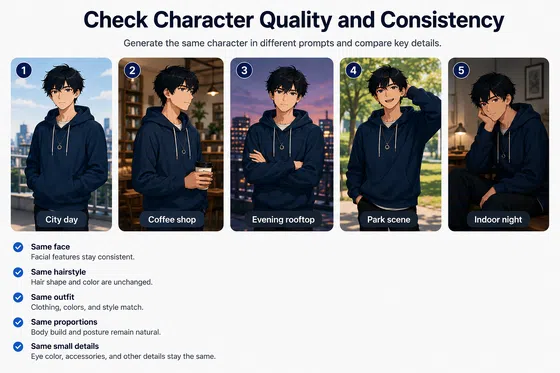
Social clips, character introductions, anime-style ads, and brief story moments work better when the generator can use a consistent image reference. An AI video maker that supports image-based input is particularly useful when an original character needs to appear across several scenes.
Pay attention to whether the tool can preserve:
-
Face shape and hairstyle
-
Eye and hair color
-
Clothing and accessories
-
Main color palette
-
Body proportions
Keeping one main action in each shot can also reduce unwanted changes. Several short clips can then be edited together into a longer sequence.
When You Need Detailed or Cinematic Shots
Anime trailers, music videos, fantasy scenes, and action sequences place more importance on camera control and shot planning.
Tools with camera presets, detailed motion prompts, keyframes, or end-frame control are more useful here. For multi-shot projects, knowing how to write a video script with clear scene and action notes can also make each generated clip easier to plan.
A cinematic anime shot depends on more than resolution. With the Veo 3.1 video generator, composition, lighting, depth, movement speed, and continuity can all be refined for more cinematic results.
Large camera moves require additional checking because both the character and environment may change as new parts of the scene become visible.
When You Need to Turn Live Action into Anime
Video-to-video or anime style transfer is usually the better option when the performance already exists.
A dance, cosplay performance, or short acting scene already contains the movement and timing required for the finished clip. The model can focus on changing the visual appearance instead of inventing the entire performance from text.
This approach often preserves movement more predictably, although faces, clothes, lines, and backgrounds should still be checked for flicker after conversion.
FAQ
Can AI generate a full anime episode?
AI can generate multiple anime-style clips, but it is not reliable enough to produce an entire episode with consistent characters and scenes in one generation. A full episode still requires a script, storyboard, character references, audio, editing, and continuity checks. Longer projects are usually created shot by shot.
Which AI tool is best for turning a video into anime?
Tools designed for video-to-video style transfer are usually the better choice. DomoAI is particularly suitable when you want to preserve the movement and timing of existing footage while changing its visual style. Your own footage is still the best way to compare style quality, stability, and pricing.
Can I keep the same anime character in every scene?
Using the same reference images and character description can improve consistency, but it does not guarantee an identical result. Hair, clothing, eye color, proportions, and other defining features should remain consistent across prompts. Front, side, and full-body references can also help.
Do I need drawing skills to make an AI anime video?
Traditional frame-by-frame drawing skills are not required for text-to-video, image-to-video, or video-to-video tools. Basic knowledge of character design, composition, and storyboarding can still improve the result. Highly customized animation may still require professional skills.
Can I use AI-generated anime videos commercially?
Commercial rights depend on the platform, model, and account plan. You also need permission to use any characters, reference images, source videos, music, or voices included in the project. A platform allowing commercial output does not automatically give you rights to protected anime characters or third-party artwork.
Do AI-generated anime videos need editing?
Yes. Most AI-generated anime videos benefit from some AI video editing to fix small issues, improve pacing, add music or captions, and prepare the video for different platforms.
You May Be Interested
480p vs 1080p: Which Resolution Should You Choose?
4K vs 1080p: Should You Upscale 1080p Video to 4K?
Animatic vs. Storyboard: Key Differences and Best Uses
6 Best Ai Character Generator in 2026: Tested & Compared
Best AI Features for Enhancing UGC Video Quality in 2026