What Is 2K Resolution? A Simple Guide for Beginners
 RoboNeo TeamAugust 18, 2026
You’ll run into resolution labels on monitors, cameras, projectors, and video export menus, but they don't always mean the same thing. True 2K resolution clocks in at 2048 × 1080 pixels. On the shop floor, though, brands love to slap “2K” on 2560 × 1440 screens—which actually goes by QHD or 1440p.
Clearing up this difference comes in handy when you’re shopping around for a screen, setting up a camera, or working on a video export. At the end of the day, checking out the actual pixel numbers tells you a lot more than just relying on the "2K" label.
Understanding 2K Resolution and Its Pixel Dimensions
Although 2K sounds like one clear technical standard, its meaning changes between digital cinema and consumer electronics.
What Does “2K” Mean?

The name basically points to an image that’s about 2,000 pixels wide. Under the Digital Cinema Initiatives standard, true 2K clocks in at 2048 × 1080, which works out to roughly 2.2 million pixels. It runs at a 1.90:1 aspect ratio, making the picture just a bit wider than your average 16:9 Full HD screen.
When someone asks what resolution is 2K, the answer boils down to the context. A movie theater usually runs on 2048 × 1080, while a computer monitor showing up with a "2K" label will most likely turn out to be a 2560 × 1440 panel.
That same confusion is why asking what is the resolution of 2K online throws back so many different answers. Before you buy into a new monitor or set up an export preset, make sure to double-check whether the actual dimensions stand at 2048 × 1080 or 2560 × 1440.
Benefits and Limitations of 2K Resolution
Standard DCI 2K offers slightly more horizontal space than Full HD. That wider frame suits cinema projection and gives filmmakers room to work with theatrical aspect ratios.
The advantages are more noticeable when manufacturers use 2K to mean QHD. On a 27-inch QHD monitor, text looks sharper than it does at 1080p, while the larger workspace can accommodate two documents side by side. A designer working on a product page might keep the editing canvas open on one half of the screen and the client’s notes on the other.
Higher pixel counts also bring several trade-offs:
Games require more graphics processing power.
Video files consume more storage, although their size also depends on the video bitrate.
Streaming higher-resolution video uses additional bandwidth.
Small screens may not reveal a dramatic improvement.
Enlarging poor-quality footage does not restore all missing detail.
A gamer moving from 1080p to 1440p may notice sharper textures but a lower frame rate. Someone watching a short clip on a six-inch phone, meanwhile, might struggle to see a meaningful difference.
Where Is 2K Resolution Commonly Used?
Digital cinema remains the main setting for true 2048 × 1080 resolution. Films can be edited, mastered, and projected in this format without the storage and processing demands of 4K.
Consumer devices use the term more loosely. Gaming monitors commonly call 2560 × 1440 “2K,” while security cameras may attach the label to several resolutions near 2,000 horizontal pixels. Action cameras and smartphones sometimes include 2K recording modes, but their exact dimensions can vary between brands.
Video editing software may create another source of confusion. If you are checking what is 2K video resolution in an export menu, 2048 × 1080 indicates DCI 2K. A 2560 × 1440 setting creates QHD video instead.
How Does 2K Compare With Other Common Resolutions?
Resolution names can make the differences appear larger or smaller than they really are. Comparing the pixel dimensions shows how much additional detail each format can hold.
2K vs 1080p
Full HD measures 1920 × 1080, while standard DCI 2K measures 2048 × 1080. Both formats contain 1,080 vertical pixels. DCI 2K adds only 128 pixels across the width, so its total pixel count is about 7% higher.
As a result, the difference in sharpness is usually subtle. A person watching the same movie in Full HD and DCI 2K on similarly sized displays may notice the wider frame before seeing finer detail. The improvement is much smaller than the names “Full HD” and “2K” might suggest.
Their intended uses also differ. Full HD follows the 16:9 format found on televisions, laptops, and streaming platforms. DCI 2K was developed for digital movie theaters and uses a slightly wider frame.
2K vs 1440p
Standard 2K and 1440p are not the same resolution. DCI 2K contains 2048 × 1080 pixels, whereas 1440p normally contains 2560 × 1440.
With more pixels in both directions, 1440p displays finer detail and provides more usable desktop space. A photographer editing portraits on a 27-inch screen can see more of the image while keeping tool panels visible. During gaming, distant objects and small interface elements may also appear clearer.
That additional detail places greater demand on the computer. A graphics card that runs a game smoothly at 1080p may produce a lower frame rate at 1440p. For users who want sharper visuals without moving all the way to 4K, the trade-off is often worthwhile.
Confusing product labels remain the main problem. Many retailers use “2K” and “1440p” interchangeably, so the pixel specifications should always take priority over the marketing name.
2K vs 4K
DCI 4K measures 4096 × 2160, twice the width and height of DCI 2K. The result is four times as many total pixels. Consumer 4K UHD is slightly narrower at 3840 × 2160 but still provides almost four times the pixel count of standard 2K.
The difference becomes most visible on large screens or during detailed production work. On a 65-inch television, a well-produced 4K nature documentary can reveal individual feathers and fine landscape textures more clearly. A video editor also has room to crop a 4K interview shot and export it at 2K without immediately losing the required output resolution.
More detail brings heavier demands. Editing 4K footage takes stronger hardware, and the files can fill a laptop drive quickly. Streaming the same content also consumes more data, which may cause buffering on a slower home connection. Image quality also depends on whether the footage is native or upscaled 4K.
Can You Enhance a Lower-Resolution Video to 2K?
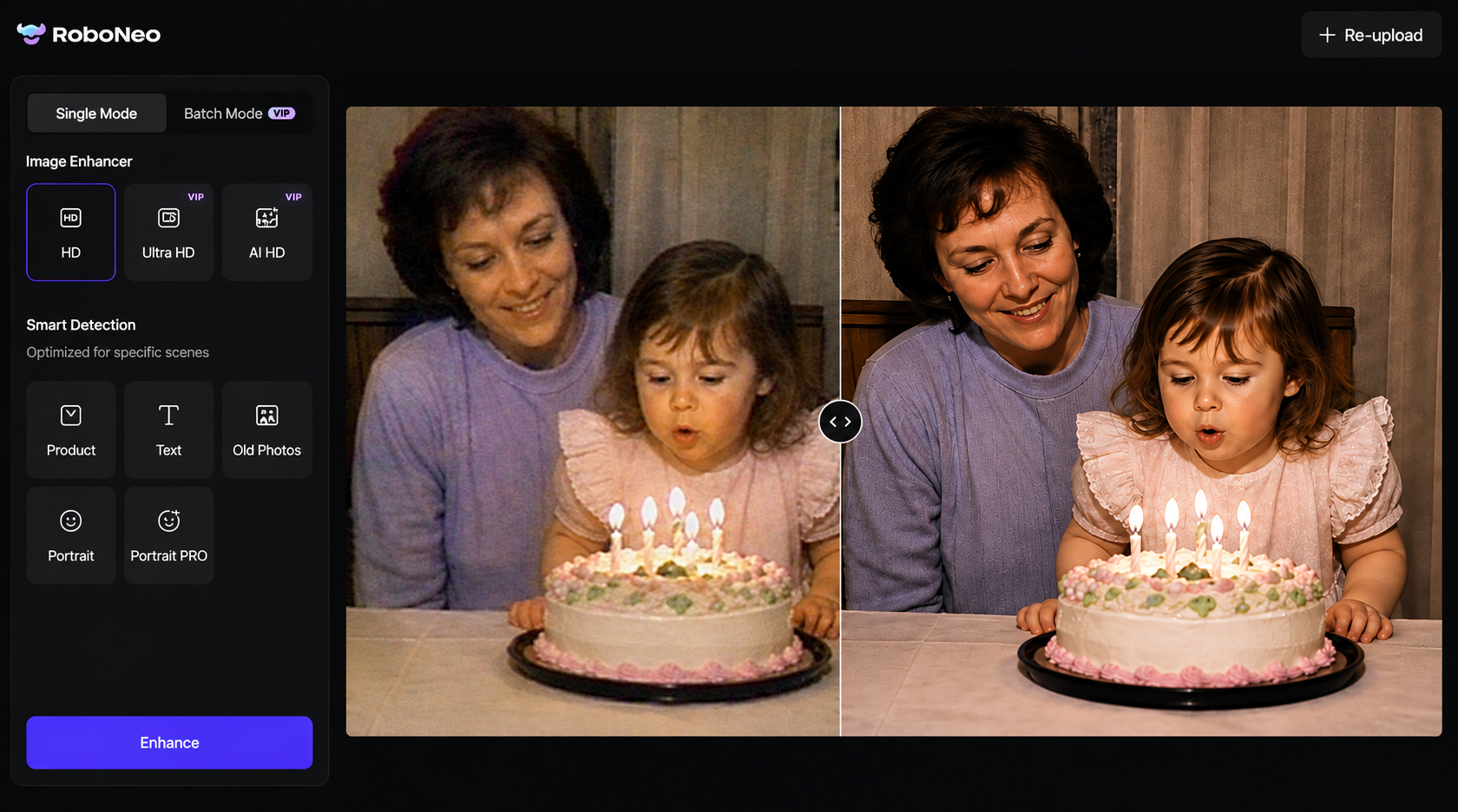
Lower-resolution footage can be enlarged to 2K through traditional interpolation or AI upscaling. Both methods increase the number of output pixels, but neither can perfectly recover information the camera failed to capture.
Traditional interpolation estimates new pixels from surrounding colors. The frame becomes larger, yet existing blur, blockiness, and jagged edges may become more obvious. A 480p family recording stretched directly to 2K can therefore look bigger without looking genuinely clearer.
AI enhancement takes a more advanced approach. It analyzes patterns across the frames and attempts to reconstruct cleaner edges, reduce noise, and soften compression artifacts. An old family clip may look more presentable on a modern television, although it will not match video originally recorded in native 2K.
The RoboNeo AI Video Enhancer allows users to upload low-resolution footage, select 2K output, and apply an enhancement option such as Auto-Detect to improve its overall appearance.
Realistic expectations remain important. AI may clarify a soft outline or reduce visible noise, but it cannot reliably reconstruct an unreadable license plate or a face that occupies only a few pixels.
How to Choose the Right Resolution

The right choice depends on where the content will appear, what the device can handle, and how much detail is actually necessary.
Choose 1080p for Everyday Viewing
Full HD remains practical for smaller screens, video calls, online streaming, and entry-level computers. It reduces hardware load while keeping storage and bandwidth requirements manageable.
During a work call on a 14-inch laptop, stable 1080p video is usually more useful than a higher-resolution stream that repeatedly freezes. Competitive gamers may also prefer 1080p because it allows their hardware to prioritize frame rate and responsiveness.
Choose 2K or QHD for Balanced Quality
QHD provides a useful middle ground between 1080p and 4K. Its sharper image suits 27-inch monitors, gaming, multi-window office work, and online content production without imposing the full hardware demands of 4K.
A remote worker who keeps a spreadsheet, messaging app, and browser visible throughout the day can benefit from the extra screen space. Before buying the monitor, however, checking whether “2K” means 2048 × 1080 or 2560 × 1440 prevents an unpleasant surprise.
When existing footage needs a higher output resolution, AI video upscaling can prepare it for a 2K project. The visible improvement will still depend on the quality of the source.
Choose 4K for Maximum Detail
Large televisions, professional editing, detailed cropping, and reframing gain the most from 4K. The format also gives creators more flexibility when the finished video will be delivered at a lower resolution.
A filmmaker recording a cooking tutorial in 4K can crop closer to the chef’s hands while still producing a sharp 1080p or 2K video. That flexibility is valuable, but it requires enough processing power and storage to manage the larger files. For footage recorded at a lower resolution, upscaling video with AI can improve its appearance but cannot turn it into genuine native 4K.
FAQ
Is 2K better than Full HD?
Standard DCI 2K packs in a few more horizontal pixels than Full HD, but both top out at 1,080 vertical pixels. Overall, it’s only a slight bump in quality. QHD—which often gets passed off as 2K—delivers a much sharper image you can actually notice.
Is 2K good enough for gaming?
Definitely. QHD is a big hit with gamers because it crisps things up compared to 1080p without dragging down your system the way 4K does. That said, actual performance still boils down to the game you’re playing, your graphics card, and your target frame rate.
Can a 1080p screen play a 2K video?
Yeah, a 1080p screen can usually run a 2K file fine, but it’ll squeeze the video down to fit your display. You just won't be able to pick up every single pixel from the original file.
Does 2K video eat up a lot more storage?
Usually, yes—a 2K video will eat into your storage space more than a similar 1080p clip. But keep in mind, things like bitrate, frame rate, codec, and compression settings also play a huge part in how big the file ends up being.
Why do some products label 1440p as 2K?
Brands like to slap "2K" on 1440p screens as a quick marketing shortcut, simply because 2560 × 1440 crosses the 2,000 horizontal pixel mark. Strictly speaking, though, that’s QHD or 1440p, whereas real DCI 2K turns out to be 2048 × 1080.
You May Be Interested
4K vs 1080p: Should You Upscale 1080p Video to 4K?

How to Use an AI Video Generator Online to Create Viral Content
6 Best Ai Character Generator in 2026: Tested & Compared
Best App to Remove Tiktok Watermark in 2026
Best TikTok Script Generator in 2026