How Long Can TikTok Videos Be? AI Video Ideas for Every Length
 RoboNeo TeamSeptember 19, 2026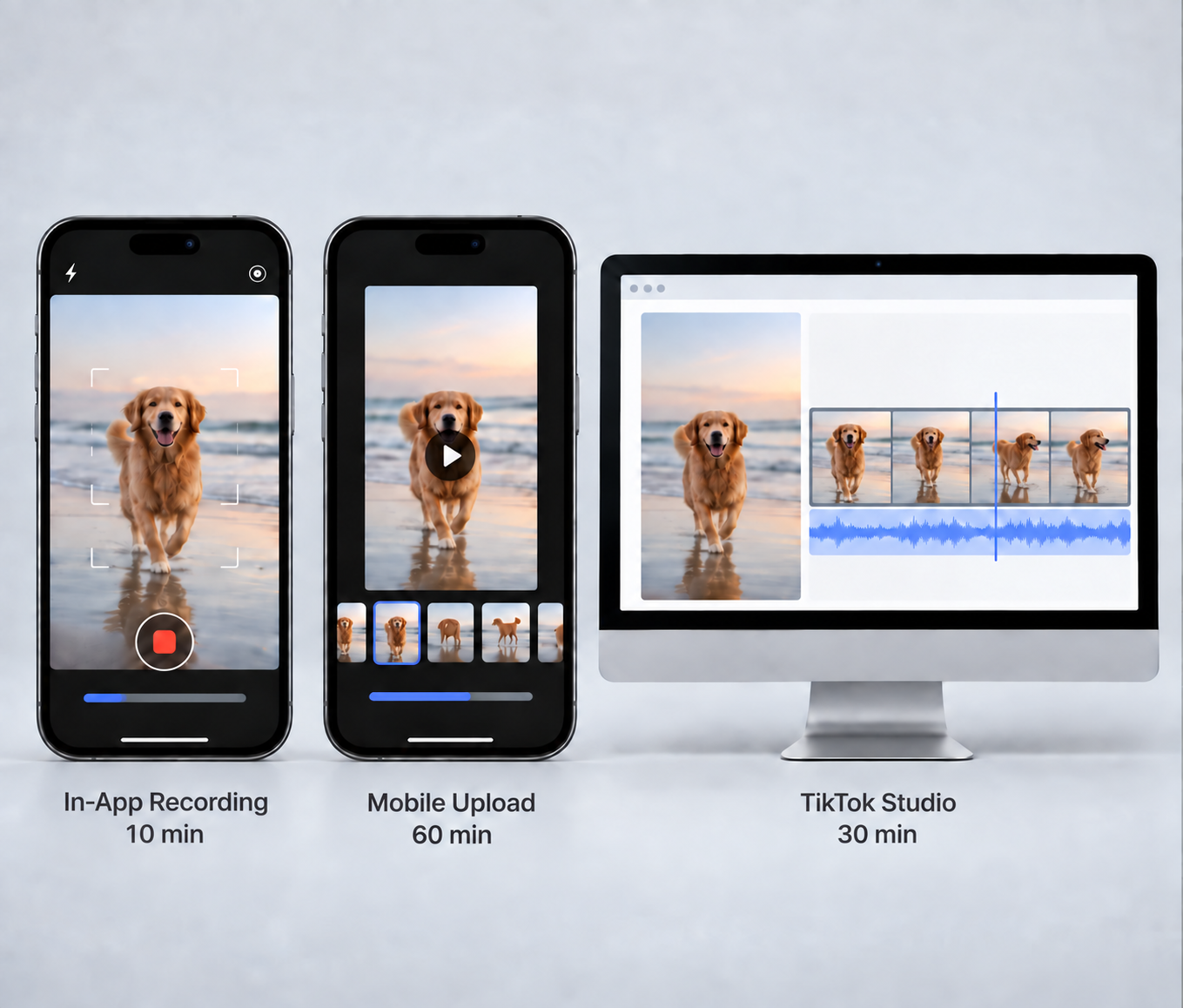
TikTok video length varies by publishing method and the options available on your account. Many users can record videos up to 10 minutes in the app, while some accounts may support prerecorded uploads as long as 60 minutes. TikTok Studio currently allows web uploads up to 30 minutes.
So, how long can a TikTok video be? The most reliable answer is the maximum shown on your own posting screen. This guide explains what different TikTok lengths are suited for, how AI-generated footage can fit into each format, and how to plan a video around the time your idea actually needs.
Current TikTok Video Length Limits
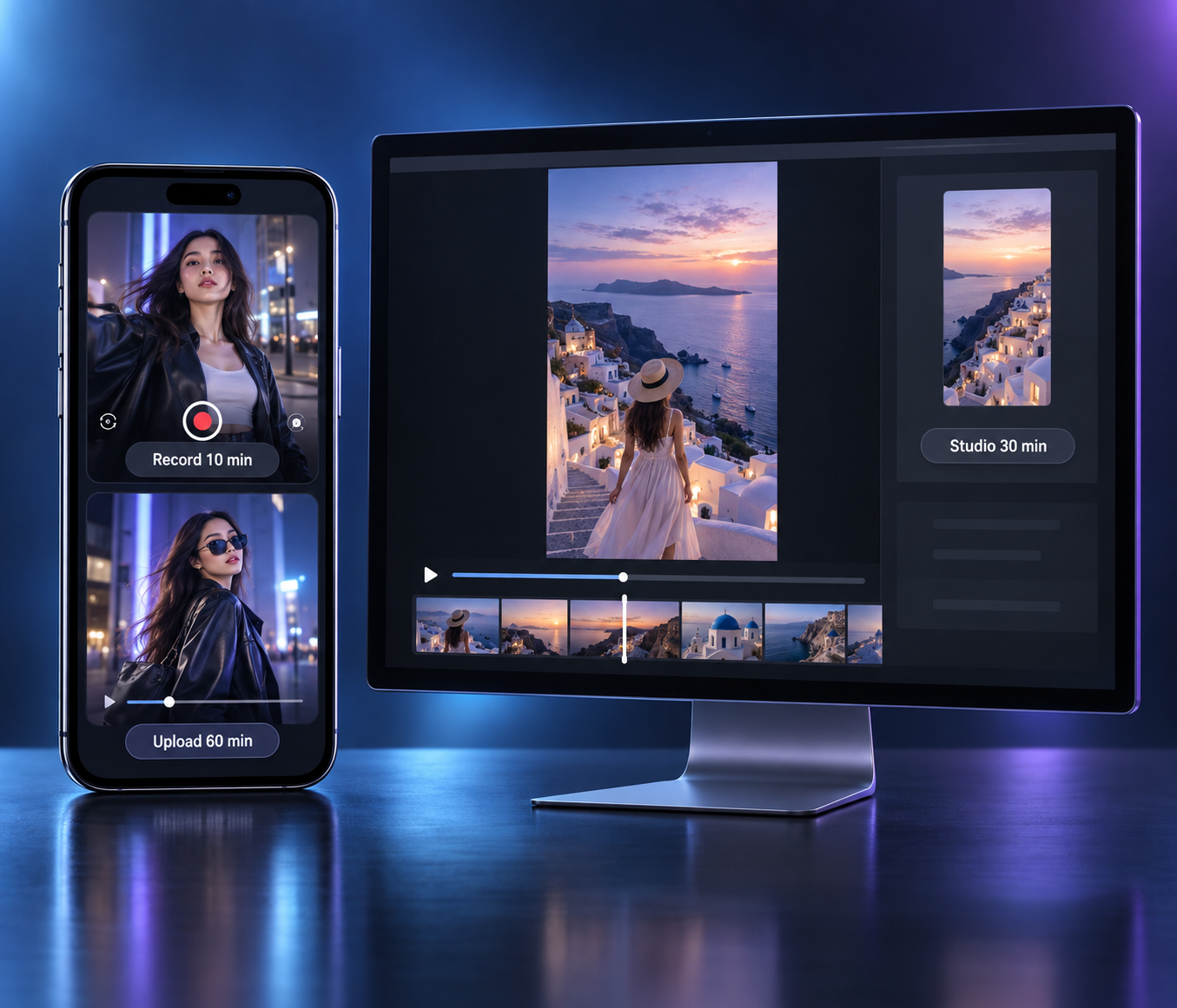
How long can videos be on TikTok partly depends on how the video is uploaded. Recording inside the app, uploading a finished file from a phone, and using TikTok Studio can come with different limits.
| Publishing Method | Typical Maximum Length | What to Know |
| In-app recording | Up to 10 minutes on many accounts | Available options can vary |
| Prerecorded mobile upload | Up to 60 minutes on some accounts | Longer uploads are not available to everyone |
| TikTok Studio web upload | Up to 30 minutes | Current upload requirements also apply |
| TikTok ads | Separate limits | Paid content follows different specifications |
TikTok Studio currently supports web uploads up to 30 minutes, with files up to 10 GB and a minimum resolution of 720 x 1280. Mobile options may vary by account, region, app version, and feature availability.
For anyone asking how long can a video be on TikTok, the upload screen is therefore more useful than one general number. If a finished video exceeds the available limit, trim less important material or divide the subject into several parts.
AI Video Ideas for Every TikTok Length
The platform limit tells you how long a video can be, but the idea should decide how long it actually lasts. A quick visual transformation and a detailed tutorial need very different amounts of time.
5-15 Seconds
Five to 15 seconds works best when the idea is easy to understand almost immediately. There is little room for background, so one reaction, reveal, transformation, or punchline usually carries the entire clip.
This makes short AI-generated motion a natural fit. A still fashion portrait can change into a new outfit, a product can rise from its packaging, or an ordinary bedroom can transform into a futuristic interior. When the concept begins with a still visual, reference image-to-video can turn that image into a short moving scene without requiring a longer setup.
Short loops also suit this range. A character can react and return to the opening pose, allowing the final frame to flow naturally back into the first. Captions should stay brief enough to read without pausing.
15-30 Seconds
With 15 to 30 seconds, there is enough room to show not only a result but also what leads to it. This makes the format useful for quick product demos, before-and-after clips, POV scenes, and short tips when making a TikTok video.
A portable blender video can start with someone leaving home without breakfast. From there, the video moves naturally to fruit being blended, followed by the finished drink during the commute. Instead of simply showing the product, the sequence gives viewers a reason for the action and a clear outcome.
Short AI stories can use the same progression. A character might begin on an ordinary subway platform, step onto a train, and emerge into a futuristic city. Each generated clip continues the previous scene, so the visual change feels like one small story rather than a collection of separate effects.
30-60 Seconds
Thirty to 60 seconds gives the video enough space for several connected points. Mini tutorials, short explainers, product walkthroughs, and simple stories can develop without rushing from one shot to another.
The longer runtime also makes logical transitions more important. In a video explaining an eclipse, the viewer could first see the positions of Earth, the Moon, and the Sun. Once that relationship is clear, the next scene can show the shadow and then what the event looks like from the ground. AI visuals help illustrate something that is difficult to film, while the explanation gives those visuals a clear sequence.
Product content can follow the same approach. A desk organization video might move from the original clutter to the main changes and then to the finished workspace. If several generated clips are involved, keeping the same product, setting, or character details helps the entire sequence feel continuous.
1-3 Minutes
One to three minutes can support a complete tutorial, short review, educational explanation, case study, or story with several stages. At this point, the video needs more structure because viewers are following an idea for longer.
A home organization video could begin by showing why a room is difficult to use, continue through sorting and storage decisions, and finish with the completed space. AI footage can support specific moments, such as previewing a different furniture layout before any real changes are made.
Stories have more room to develop as well. A character can have a clear goal, face a problem, and reach a conclusion without forcing several events into a few seconds. Reusing the same visual references, clothing details, and setting descriptions can help recurring characters remain recognizable across generated scenes.
AI does not need to fill the whole video. Real footage, narration, screen recordings, and generated scenes can each handle the parts they are best suited for.
Over 3 Minutes
Past three minutes, visual novelty alone is unlikely to carry the video. The audience needs continuing information, story development, or both.
Detailed tutorials, reviews, interviews, documentary-style content, and topic compilations fit this range better. An AI video maker can provide supporting scenes for moments that are difficult to capture, while narration, real footage, or screen recordings continue to carry the main content.
A history video might explain how one neighborhood changed across several decades, with generated scenes helping viewers picture earlier periods. A software video could take a similar approach by using real screen recordings for the workflow and AI visuals for chapter openings or abstract concepts.
When individual sections make sense on their own, splitting the topic into a series may be another option.
How to Plan Videos Around TikTok's Length Options

Knowing TikTok's maximum length gives you a boundary. The next step is deciding how much of that time your content actually needs.
Step 1: Check Your Available Video Length
Before writing a long script or creating multiple clips, check the duration options shown in TikTok or TikTok Studio.
A single product feature may only need 20 seconds, while a recipe or review may take more than a minute. If the full idea exceeds your account's available limit, decide early whether to remove secondary points or split the topic into several videos.
Step 2: Map Out Each Section
Once the target length is clear, divide the time according to the role of each section. A clear video script can help organize spoken content, visuals, and approximate timing before production begins.
A 45-second product demo might use the first few seconds to establish the problem, most of the runtime to show the product in use, and the ending to reveal the result. This prevents the introduction from taking up time that the actual demonstration needs.
Tutorials can follow their individual steps, while stories can move through plot stages. Whatever the format, most of the runtime should go to the part that delivers the main value.
Step 3: Create Clips for Each Section
After the sequence is planned, you can identify which moments actually need generated footage.
In RoboNeo, separate clips can be created around the subject, action, setting, and camera movement required for each part. A sneaker video could move from the shoe landing on wet pavement to a runner crossing a city street and then to a final close-up.
Because these shots belong to the same video, recurring people and products should keep the same references and key visual details. Reviewing each clip before editing also makes it easier to catch incomplete movements or noticeable changes.
Build TikTok Videos in RoboNeo
Step 4: Edit the Video to Fit Your Target Length
The final edit should keep the planned sequence clear. AI clips, real footage, screen recordings, narration, and captions can all be combined, but each element should move the video forward.
If the cut runs long, remove repeated actions, unnecessary pauses, and secondary details before speeding up the entire video. When it feels too short, add missing explanation instead of replaying footage.
The goal is not to reach a round number. A complete 70-second tutorial is stronger than the same information awkwardly compressed into one minute.
What to Check Before You Post
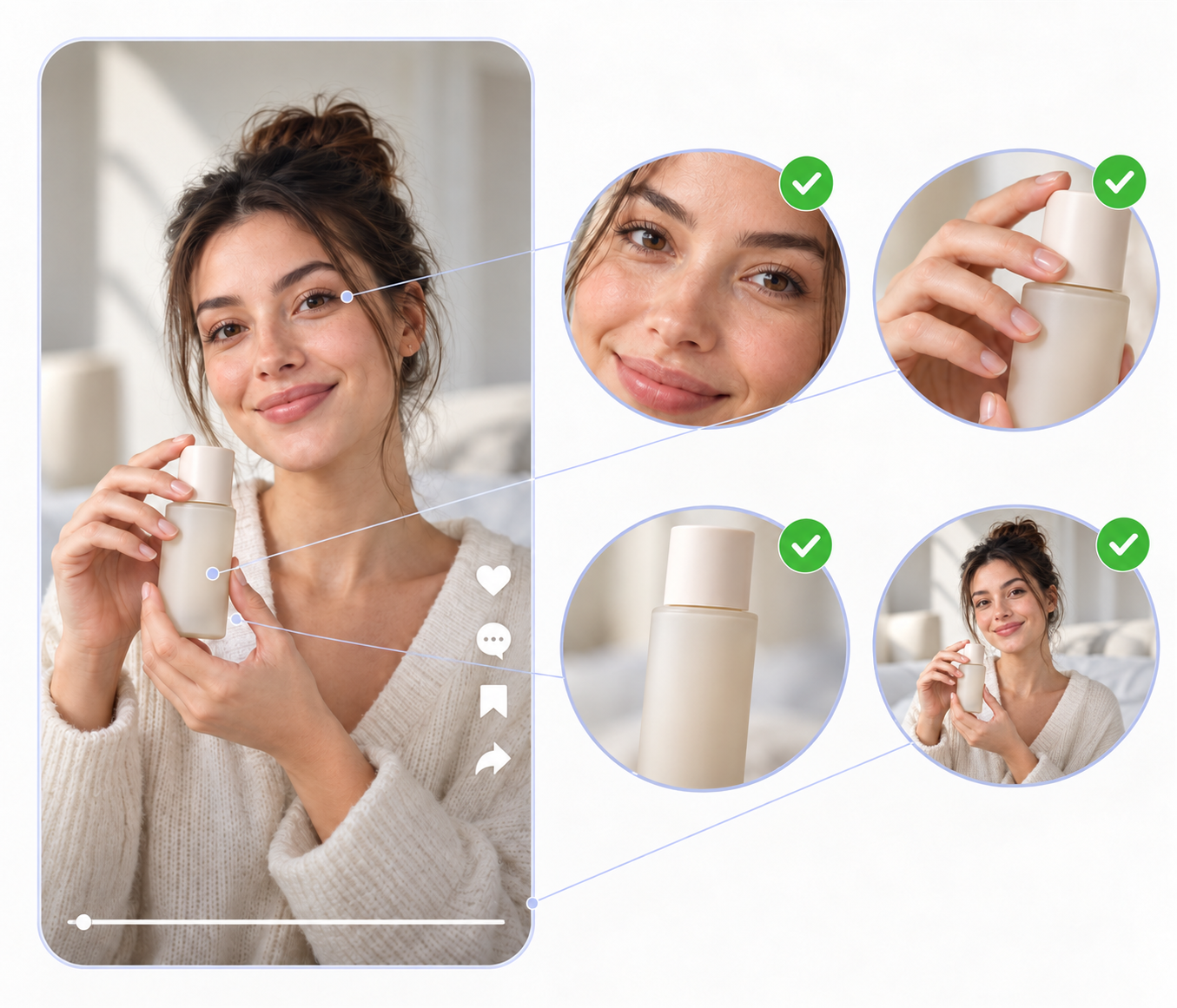
Before publishing, watch the finished video on a phone so you can see how it works with TikTok's interface.
Keep subtitles, faces, and important product details away from interface elements.
Check subtitle timing and readability with sound both on and off.
Look for changing faces, distorted hands, inconsistent products, or unnatural AI transitions.
Remove black borders, unwanted watermarks, and editing mistakes.
Confirm that music, images, footage, likenesses, and brand assets have the necessary usage rights.
Make sure the cover and caption accurately reflect the finished video.
AI disclosure also matters. TikTok requires labels for certain realistic AI-generated or significantly altered content and may automatically label some material. Extra care is needed when AI changes the appearance, voice, or actions of a real person.
FAQ
What is the maximum length of a TikTok video?
The maximum depends on the account and publishing method. Many users can record up to 10 minutes in the app, while some accounts may support prerecorded uploads up to 60 minutes. TikTok Studio currently allows web uploads up to 30 minutes.
The most reliable limit is the one shown in your own uploader.
What is the best length for a TikTok video?
There is no single best length. A reaction or visual transformation may only need a few seconds, while a tutorial, review, or story can require one or several minutes.
The video should be long enough to complete the idea without adding scenes that provide no new information.
Can I upload a 30-minute video to TikTok?
TikTok Studio currently supports web uploads up to 30 minutes when the video meets its upload requirements. The same option may not appear through every mobile account or publishing method, so check your available duration first.
Do longer TikTok videos get more views?
Longer videos do not automatically receive more views. Extra time can help when a topic needs more explanation, but it can also make viewers leave when the main idea has already been delivered.
A detailed tutorial may justify several minutes, while a short visual joke usually benefits from ending soon after the payoff.
Do I need to label AI-generated TikTok videos?
TikTok requires disclosure for certain realistic AI-generated or significantly altered images, audio, and video. Some AI content may also receive automatic labels.
When AI changes how a real person looks, sounds, or behaves, creators should also consider consent and authenticity before publishing.
You May Be Interested
How to Make AI Baby Videos: Beginner-Friendly Guide

How to Make Realistic AI Videos: Tips and Mistakes
How to Upload High Quality Videos to TikTok
How to Make AI Videos: Beginner Tips and Best Tools
Best AI Tools to Fix Blurry Videos in 2026