5 Best AI Ad Generators for Image and Video Ads in 2026
 RoboNeo TeamNovember 19, 2026
Your ads need to be fresh every week. A designer, if you have one, needs days for each new batch. That gap is where many small brands get stuck, and it's the gap an AI ad generator promises to close.
As a content writer who works on ad copy for small brands, I wanted to know which tools give you ads you can actually run and which ones just hand you pretty templates. So I compared five popular options to find the best AI ad generator for different jobs, from quick social images to short video ads. I kept the checks simple: ready-to-use sizes, control over your brand, and honest pricing.
Below, you'll find a quick comparison table, a short breakdown of each tool, an honest look at AdCreative.ai, the best free and video picks, and a simple way to make your first ad with RoboNeo.
Best AI Ad Generator Tools at a Glance
The best generator for you depends on the kind of ad you make most. If you run lots of static social ads, AdCreative.ai is built for that volume. If you want image and video ads from one brief, RoboNeo covers both, while Creatify is the stronger pick for product videos. Canva and Predis.ai suit beginners and social-first teams.
| Tool | Best for | Image / Video | Free option | Starting price |
|---|---|---|---|---|
| AdCreative.ai | Static ads at scale with performance scoring | Image; video on higher plans | 7-day trial with 10 credits | $39/month |
| RoboNeo | Image and video ads from one photo or prompt | Both | Free credits when you sign in | Free to start |
| Canva | Quick template ads for beginners | Mostly image, simple video | Free plan | Pro $18/month ($144/year) |
| Creatify | Product videos and UGC-style ads | Both, video first | Free plan, 10 credits a month (watermarked) | $39/month |
| Predis.ai | Social posts, carousels and ads from one prompt | Both | Limited free tier (watermarked) | $32/month ($19/month billed yearly) |
Prices were checked in 2026. Credit-based tools change their plans often, so confirm the numbers on each pricing page before you pay.
5 Best AI Ad Generator Tools in 2026
Each tool below gets the same quick treatment: what it is, three key features, the pros and cons that matter, pricing, and who it suits best. That way you can compare them side by side without wading through marketing copy.
AdCreative.ai
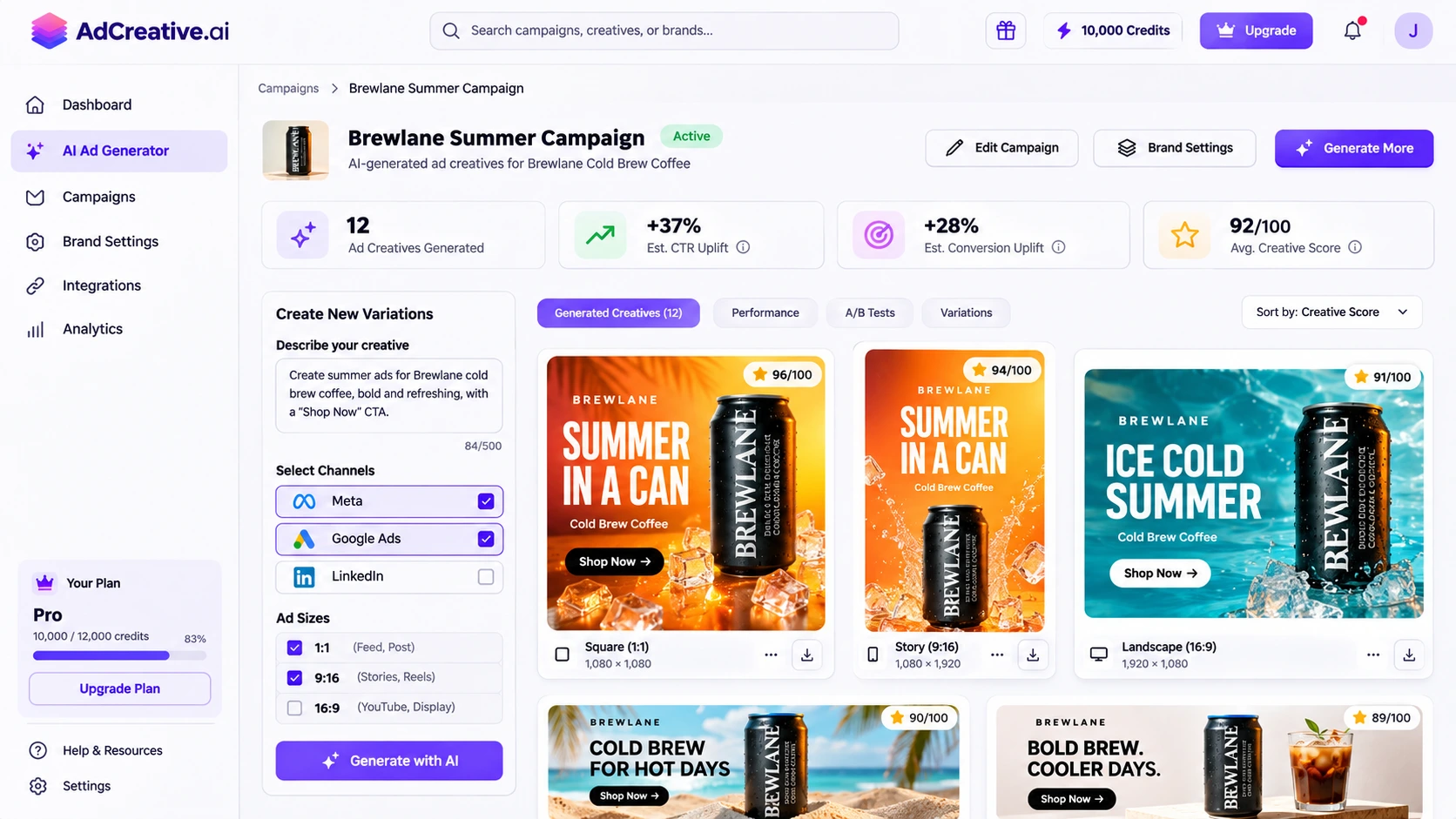
AdCreative.ai is one of the best-known names in this space. It's the tool most people mean when they type "ad creative ai" into Google. You add your logo, colors and product, and it produces batches of ad designs in standard ad sizes, then scores each one on how likely it is to perform.
Key features:
-
Creative scoring: Each design gets a predicted performance score, so you can shortlist before you spend a cent on media.
-
Product photoshoots: It places your product photo into new AI-made scenes.
-
Ad account connections: It links to Meta, Google and LinkedIn ad accounts, so finished ads go straight to your campaigns.
Pros:
-
A fast way to get many static ad sizes from one brand setup.
-
The scores help newer marketers choose between near-identical versions.
Cons:
-
Credits are spent on downloads, and 10 a month on Starter go quickly.
-
Video ads only unlock on the much pricier Professional plan.
Pricing: Starter costs $39 a month for 10 download credits, or about $20 a month billed yearly. Professional, which adds video, is $249 a month. There's a 7-day free trial with 10 credits.
Best for: Performance marketers who run a high volume of static ads and want data to help pick winners.
RoboNeo
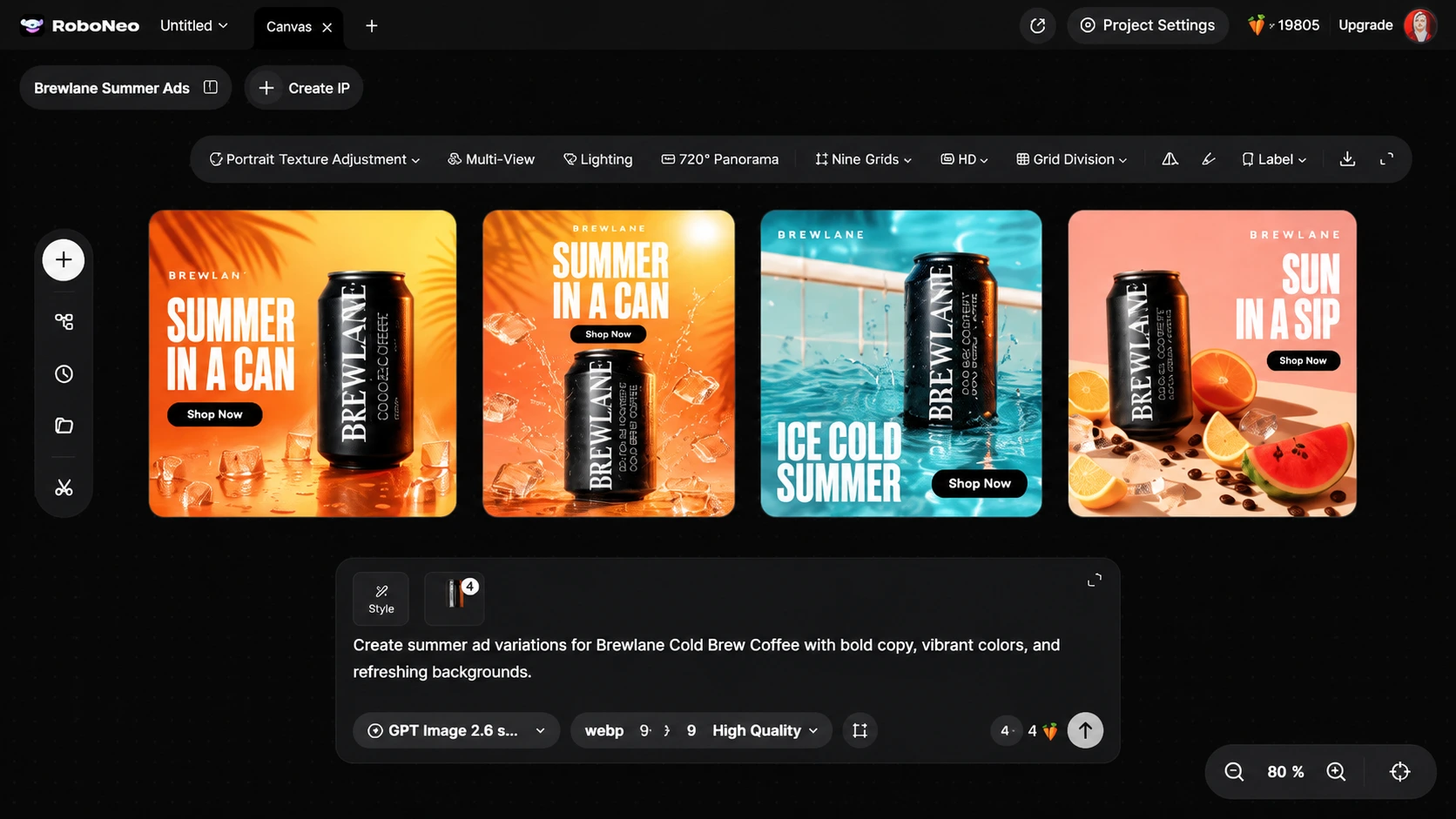
RoboNeo is an AI creative workspace with an agent at its core. You give it a product photo, a brand asset or just a line of text, and it turns that into ad visuals and short video clips you can keep shaping on one canvas. Its AI advertising generator is set up for paid social, seasonal promos and product launches.
Key features:
-
Batch variations: Create several versions from one input, which makes A/B testing much easier.
-
One-click style and color switching: Change the look of an ad without rebuilding it.
-
Sizes for every feed: Make 9:16, 1:1 and 16:9 versions for TikTok, Instagram, Facebook and X.
Pros:
-
Image and video ads live in the same workspace, so you aren't juggling two tools.
-
A simple phone photo or a short prompt is enough to start. No studio or camera setup needed.
Cons:
-
It focuses on making creatives, not on predicting results or launching campaigns, so you'll still test performance in your ad manager.
-
Every generation uses credits, so regular video work will likely need a paid plan.
Pricing: You get free credits when you sign in, which is enough to try image and video ads before paying. Paid plans add more credits.
Best for: Small brands, ecommerce sellers and creators who want image and video ads from one brief.
Canva
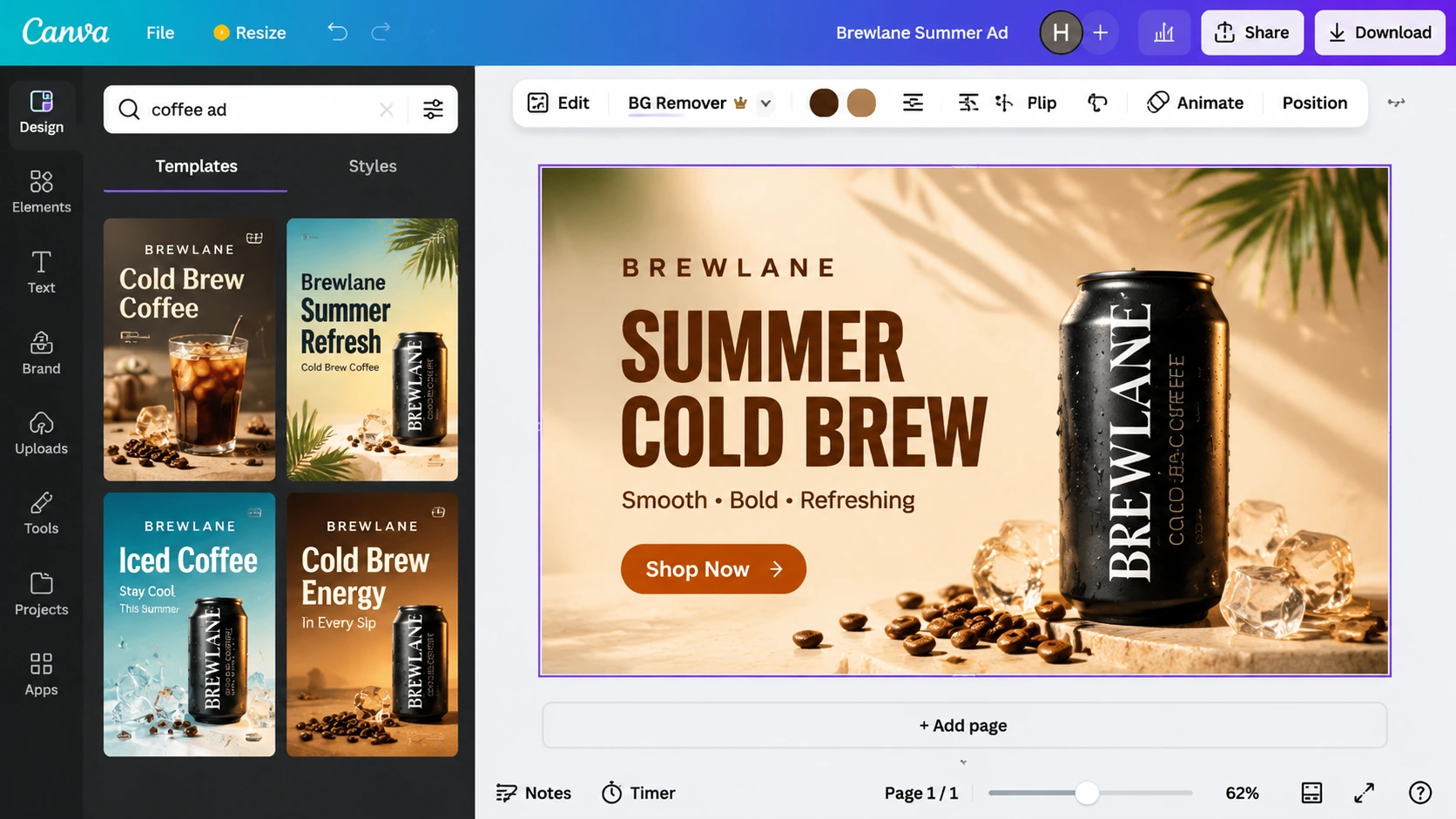
Canva hardly needs an introduction. Its ad templates and AI design tools let you turn a product photo into a social ad in minutes, and the drag-and-drop editor is about as friendly as design software gets.
Key features:
-
Ad templates: Thousands of ready layouts sized for Facebook, Instagram, YouTube and more.
-
Magic Design and AI image tools: Generate layouts and edit images from a short prompt.
-
Brand Kit: Keep your logos, colors and fonts in one place on paid plans.
Pros:
-
Very easy to learn, even if you've never designed an ad.
-
The free plan has no time limit.
Cons:
-
Results can look familiar, since thousands of brands start from the same templates.
-
It isn't built to churn out dozens of test variations from one input.
Pricing: Free plan available. Canva Pro is $18 a month, or $144 a year (about $12 a month).
Best for: Beginners and small teams who want simple, good-looking ads without a learning curve.
Creatify
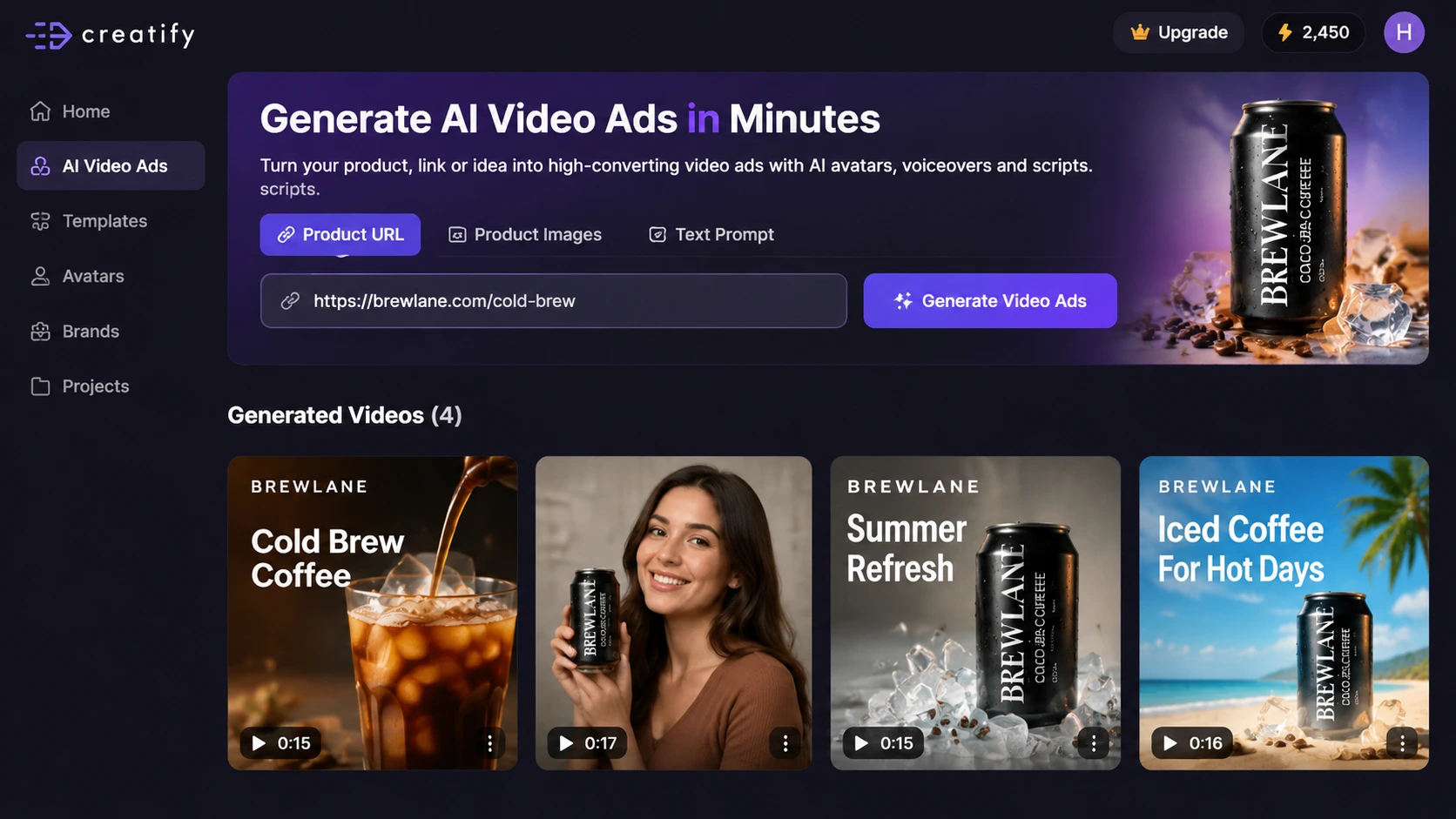
Creatify is all about video. Paste a product link, and it pulls images and details from the page to build short video ads, including UGC-style clips with AI avatars talking about your product.
Key features:
-
Link to video: Turns a product page URL into a ready video ad draft.
-
AI avatars: Hundreds of AI actors for UGC-style ads, even on the free plan.
-
Image ads too: The same credits can also make static image ads.
Pros:
-
One of the quickest routes from a product page to a short video ad.
-
The free plan lets you test the workflow properly.
Cons:
-
Avatar quality varies, so you may spend credits regenerating clips.
-
Free exports carry a watermark, so they aren't ready for paid campaigns.
Pricing: The free plan gives 10 credits a month, roughly 2 video ads or 20 image ads, with a watermark. Starter is $39 a month for 100 credits, and Pro is $99 a month. Yearly billing costs less.
Best for: Ecommerce brands that need product videos and UGC-style ads on a budget.
Predis.ai
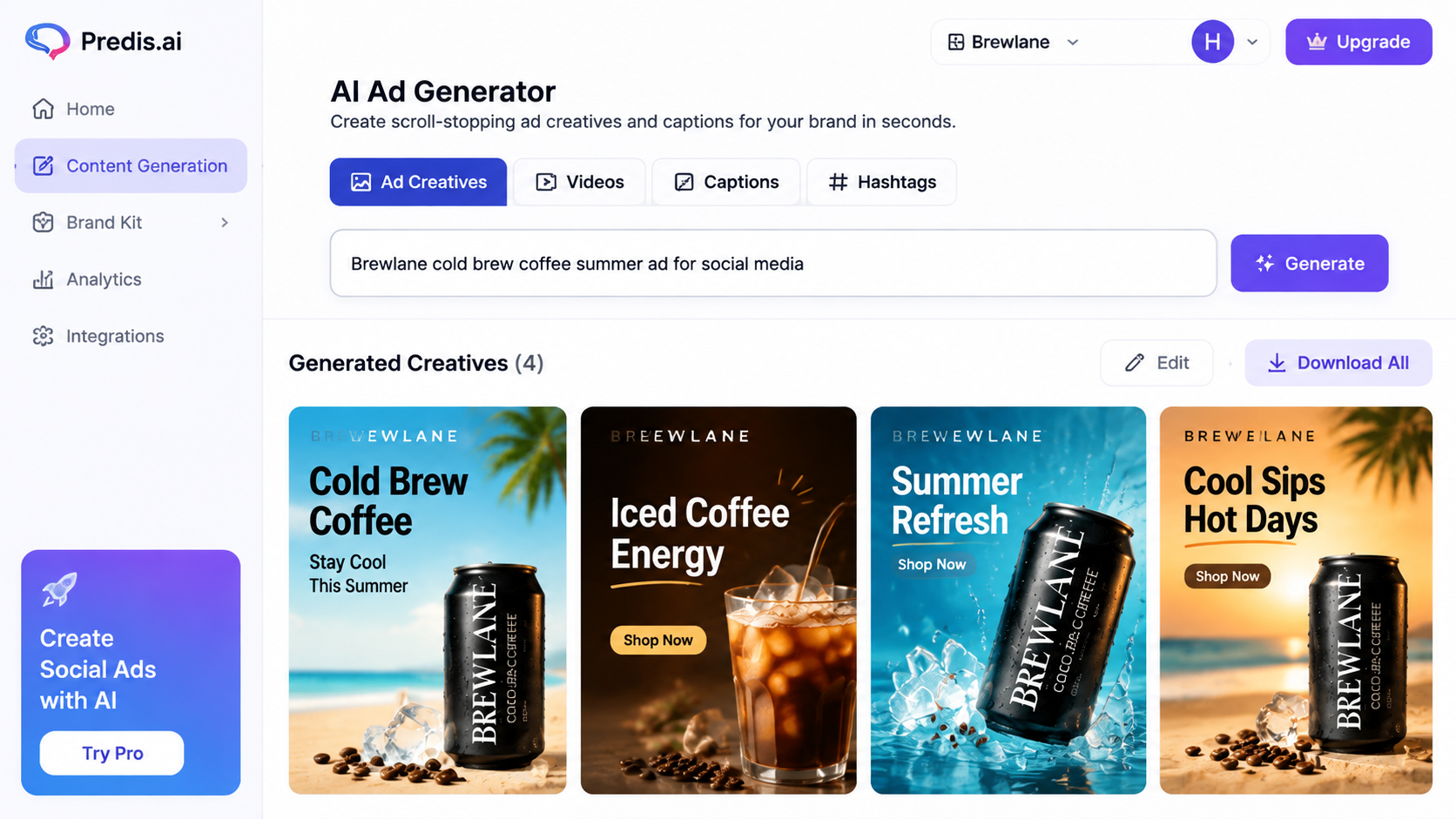
Predis.ai is a social media content tool that also makes ads. From one text prompt, it writes the copy and designs posts, carousels, short videos and ad creatives in your brand colors. It can schedule them too.
Key features:
-
Prompt to post: Copy and design come from a single line of text.
-
Many formats: Single images, carousels, short videos and ad creatives.
-
Scheduling and competitor insights: Publish to your channels and see what competitors post.
Pros:
-
Covers everyday social posts and ads in one tool.
-
Good value for teams who post often.
Cons:
-
Designs can feel generic until you edit them.
-
The free tier is limited and adds a watermark.
Pricing: The Core plan costs about $32 a month, or $19 a month billed yearly, with 1,300 credits a month.
Best for: Social media managers who want ads and regular posts from the same place.
Ad Creative AI Review: Is It Worth It?
A lot of people search "ad creative ai" or even "creative ad ai" when they really mean AdCreative.ai. So it deserves a closer look. This creative AI review pulls together what real users say on G2, Trustpilot and Reddit, not just what the brand says about itself.
What users like:
-
Speed: Users often say they get a full set of ad sizes in minutes instead of waiting days for a designer.
-
Easy social visuals: The output is clean and on-brand enough for everyday social ads, especially for small teams.
-
Creative scoring: Many reviewers find the scores handy when they can't decide between similar versions.
Common complaints:
-
Outputs need rework: Some designs need fixing, from awkward text placement to product details that don't look quite right.
-
Trial and billing issues: A recurring theme on Trustpilot and Reddit is trial credits running out fast, followed by an automatic charge that users didn't expect.
-
Credit math: Credits are used per download, so 10 credits a month can disappear after a single campaign.
Is Ad Creative AI free? Not really. There's no permanent free plan, only a 7-day trial with 10 credits, and reviewers say a card is usually needed to start it. So when people search "ad creative ai free," a short trial is the closest they'll get. If you try it, set a reminder to cancel before the trial ends.
Our take: It's worth paying for if you run many static ads every month and actually use the scores to pick winners. If you only need a handful of ads, or you want video without paying $249 a month, other tools on this list give you better value.
Best Free and Video AI Ad Generator Options
Two questions come up again and again: which tool is free, and which one is best for video? Here are quick answers, all drawn from the five tools above.
Best Free AI Ad Generator
The honest truth is that no tool here is completely free with no limits. RoboNeo gives you free credits when you sign in, which is enough to test both image and video ads before deciding. If you want the best AI ad generator free of charge for simple template ads, Canva is the safest bet, since its free plan never expires. Creatify's free plan is good for trying video, but exports carry a watermark.
Before you settle on any free option, check four things: watermarks, monthly credit caps, commercial use rights, and whether a "free trial" quietly turns into a paid plan.
Best AI Video Ad Generator
Creatify is the best AI video ad generator here if you sell physical products and want UGC-style clips from a product link. RoboNeo is the better fit when one campaign needs both video and images, say a 9:16 Story video plus square feed ads from the same brief. AdCreative.ai does make video ads, but only on its $249-a-month Professional plan.
How to Choose the Right AI Ad Creative Generator
A flashy demo doesn't tell you much. What matters is whether an AI ad creative from the tool is something you'd actually put money behind. Run through these four checks before you commit:
-
Ad type: Decide first if you mostly need static images, carousels or video. A video-first tool won't help much if you only run feed images.
-
Brand control: Look for logo, color and font settings, and check that your product still looks like your product. A coffee can that suddenly has a different label is a wasted credit.
-
Variations: Count how many versions you get per run and how easy it is to change one detail. More variations mean more to test.
-
Price and limits: Read the fine print on credits, watermarks and trial terms. Work out what one finished ad really costs, not just the headline monthly price.
How to Create Ads with RoboNeo
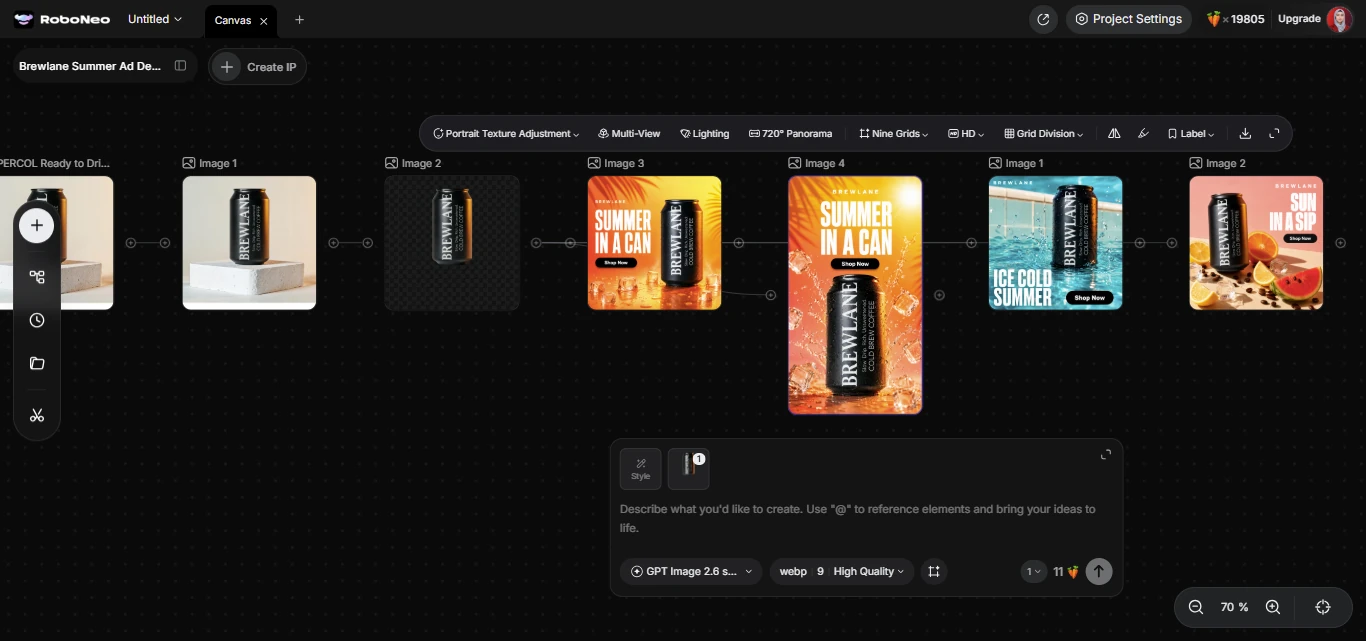
Those four checks point to one practical need: a place where ideas, variations and sizes come together without switching tools. Here's how to make your first ad in RoboNeo. We'll use a made-up cold brew brand called Brewlane as the example.
Step 1: Upload Your Product or Type Your Idea
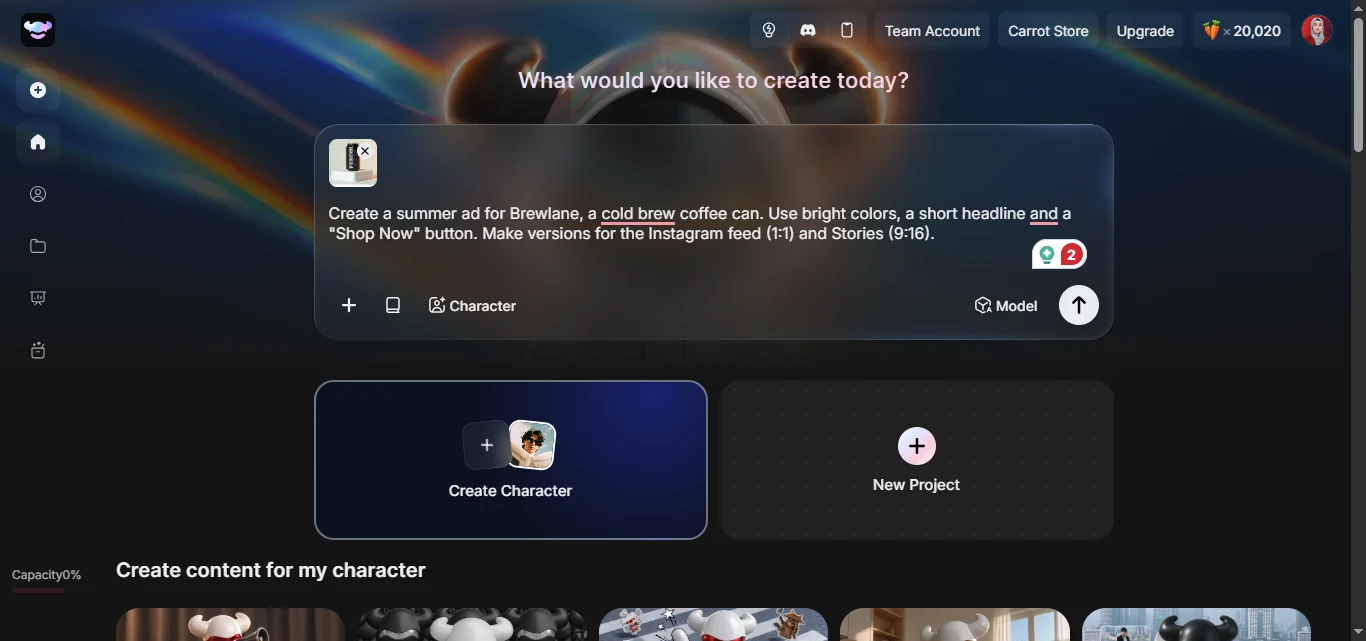
Sign in to RoboNeo and start a new project. Upload a product photo, or type your campaign idea into the prompt box. Mention the platform and sizes you need so the agent knows where the ad will run.
Create a summer ad for Brewlane, a cold brew coffee can. Use bright colors, a short headline and a "Shop Now" button. Make versions for the Instagram feed (1:1) and Stories (9:16).
Step 2: Generate Ad Variations
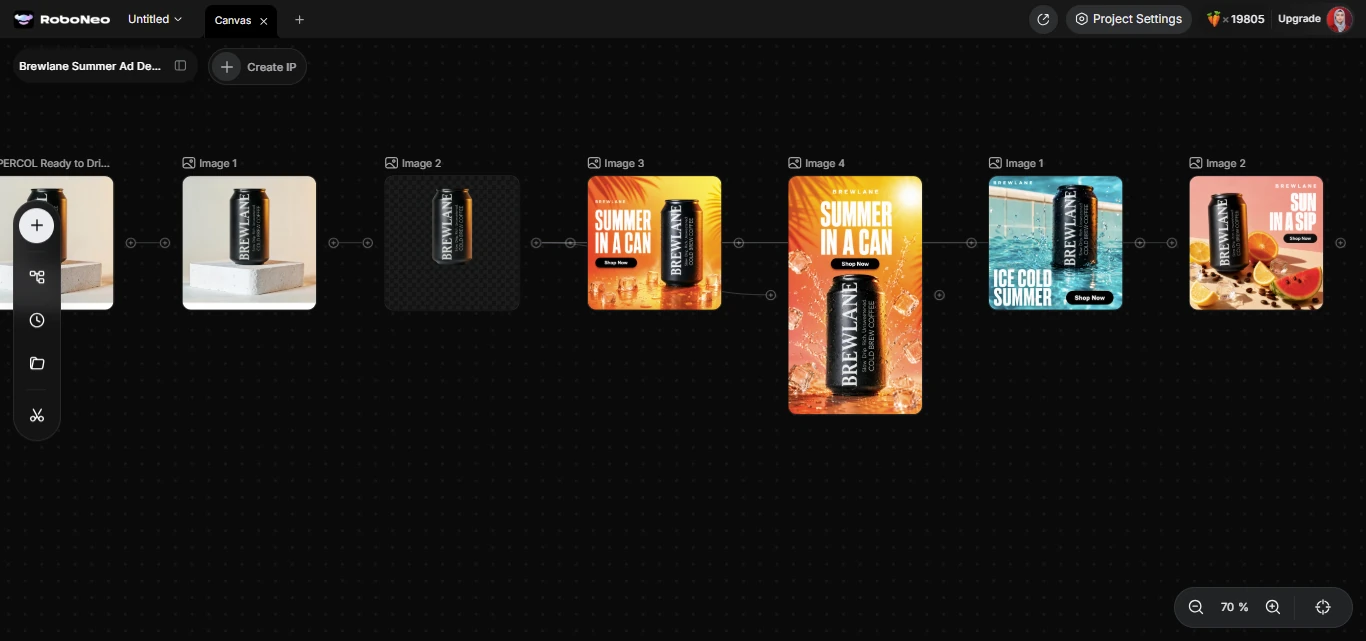
Send the prompt and let RoboNeo create several versions. Compare them side by side, then ask for changes in plain words, such as "make the background warmer" or "try a bolder headline." You don't have to start from scratch for each tweak.
Step 3: Adjust the Style and Download
Pick your favorite version and switch its style or color with one click if needed. Before you use any AI generated ad creative, zoom in on the product, the spelling and the button text. Then download each size you need.
Conclusion
There's no single winner here, and that's good news. The best AI ad generator is the one that matches the ads you make most. AdCreative.ai suits scored static ads at scale, Creatify suits product videos, Canva suits easy template work, and Predis.ai suits teams that post every day.
Whichever tool you lean toward, start with its free plan or trial. Make three or four real ads, check them closely, and ask yourself which ones you'd actually pay to run. That small test tells you more than any feature list.
If you'd like image and video ads from one brief without juggling tools, give RoboNeo a try. Sign in for free credits, upload one product photo, and see how many ready-to-post versions you get in a single session.
FAQs
1. What is the best AI ad generator?
It depends on the ads you make. AdCreative.ai suits high-volume static ads with performance scoring, Creatify suits product videos and UGC-style ads, and RoboNeo handles both image and video ads from one photo or prompt. Canva is the easiest choice for beginners, so try a free plan or trial before you commit.
2. Is there a free AI ad generator?
Yes, but each one has limits. Canva has a free plan, Creatify gives 10 watermarked credits a month, and RoboNeo offers free credits when you sign in. AdCreative.ai only has a 7-day trial. Always check for watermarks, credit caps and commercial use rights before running free ads.
3. Is AdCreative.ai worth the price?
It can be worth it for teams that run many static ads and use its performance scores. The $39 Starter plan includes only 10 download credits a month, and video ads need the $249 Professional plan. Some users report surprise charges after the free trial, so cancel in time if you don't plan to continue.
4. Can AI generate video ads?
Yes. Creatify turns product links into video ads with AI avatars, RoboNeo creates short video clips from a photo or prompt and offers AI video editing, and Predis.ai makes short social videos. Review every video before publishing, especially product details, on-screen text and voiceovers.
5. Can I use AI-generated ads on Facebook, Instagram and Google?
Generally yes, as long as the ads follow each platform's rules. Meta's Advertising Standards apply to AI-made ads just like any other ad, and Google has similar policies. Ads about social issues, elections or politics that use realistic AI-altered content need a disclosure. Also check that your tool's terms allow commercial use.
6. Will AI ad generators replace designers?
Unlikely for most brands. AI tools handle repetitive work well, such as resizing, quick variations and first drafts. Designers still set the brand's direction, judge quality and build the big campaign ideas. Many teams now use AI for volume and keep designers for the creative work that matters most.
You May Be Interested
7 Best Image-to-Video AI Generators Compared
Best AI Video Generator 2026
Best TikTok Script Generator in 2026
Best AI Character Generator