What Is a Video Watermark and How Does It Work?
 RoboNeo TeamJuly 22, 2026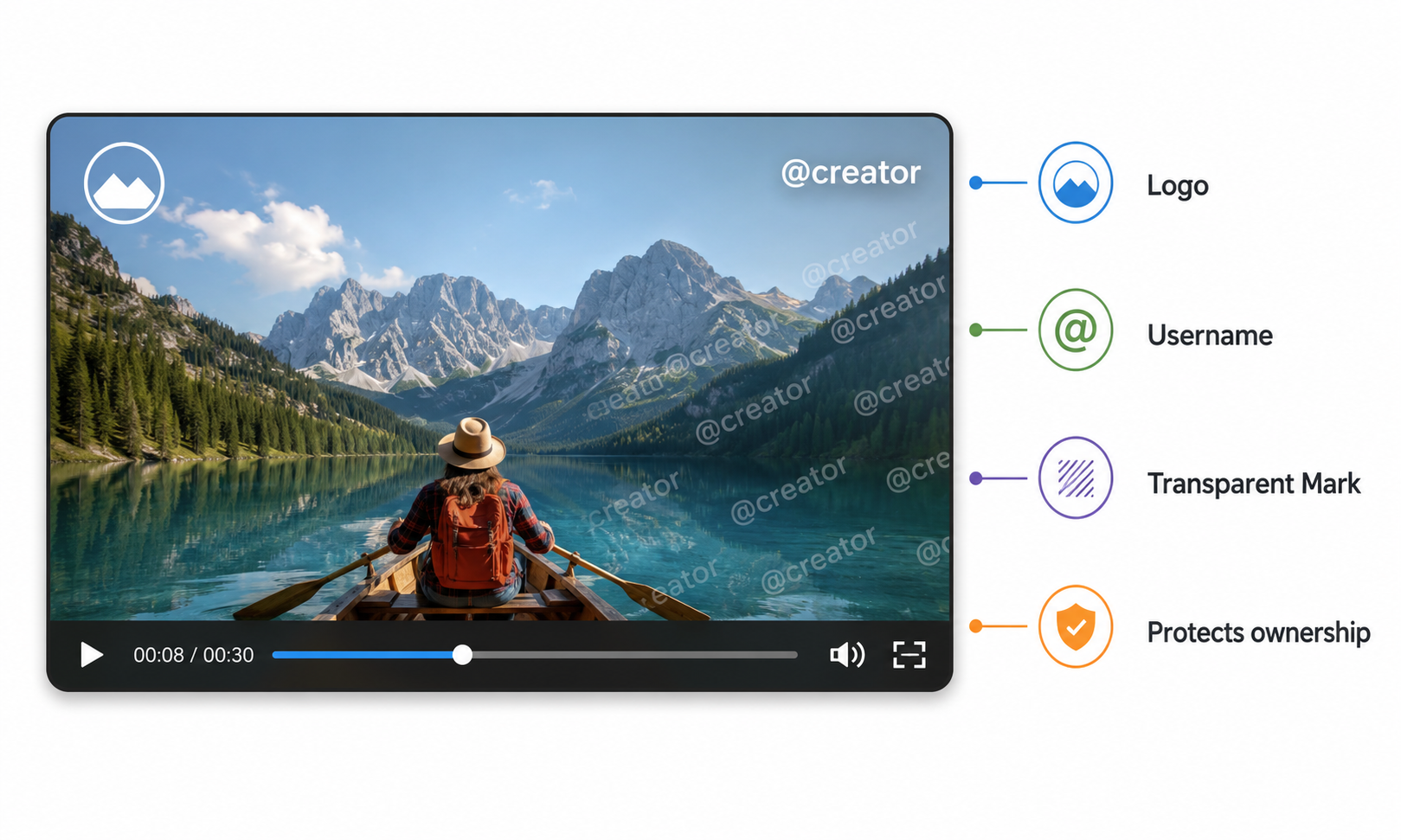
What is a video watermark? It’s a visible logo, text, username, or pattern layered over a video to lock down ownership, give credit where it’s due, or protect the content. This guide breaks down what is a watermark in a video (also commonly searched as what is a watermark on video), covers the main types and what they’re used for, points out how to remove it, and shows you how to do it safely.
Common Types of Video Watermarks

Video watermarks come in all shapes and sizes, depending on where they sit, how see-through they are, and whether they move around. Once you know what to look for, it’s super easy to tell them apart.
Static Logo Watermarks
A static logo stays put in the exact same spot throughout the video, usually tucked away in one of the corners. You’ll mostly see these pop up as company logos, channel icons, or personal branding.
Text and Username Watermarks
These watermarks spell out the creator’s name, website, copyright notice, or social media handle. They constantly show up on short-form videos and reposted clips.
Transparent and Repeating Watermarks
Transparent watermarks are faded logos or text that blend into the video. Sometimes they spread out across the entire screen, making it next to impossible to crop them out.
Moving and Dynamic Watermarks
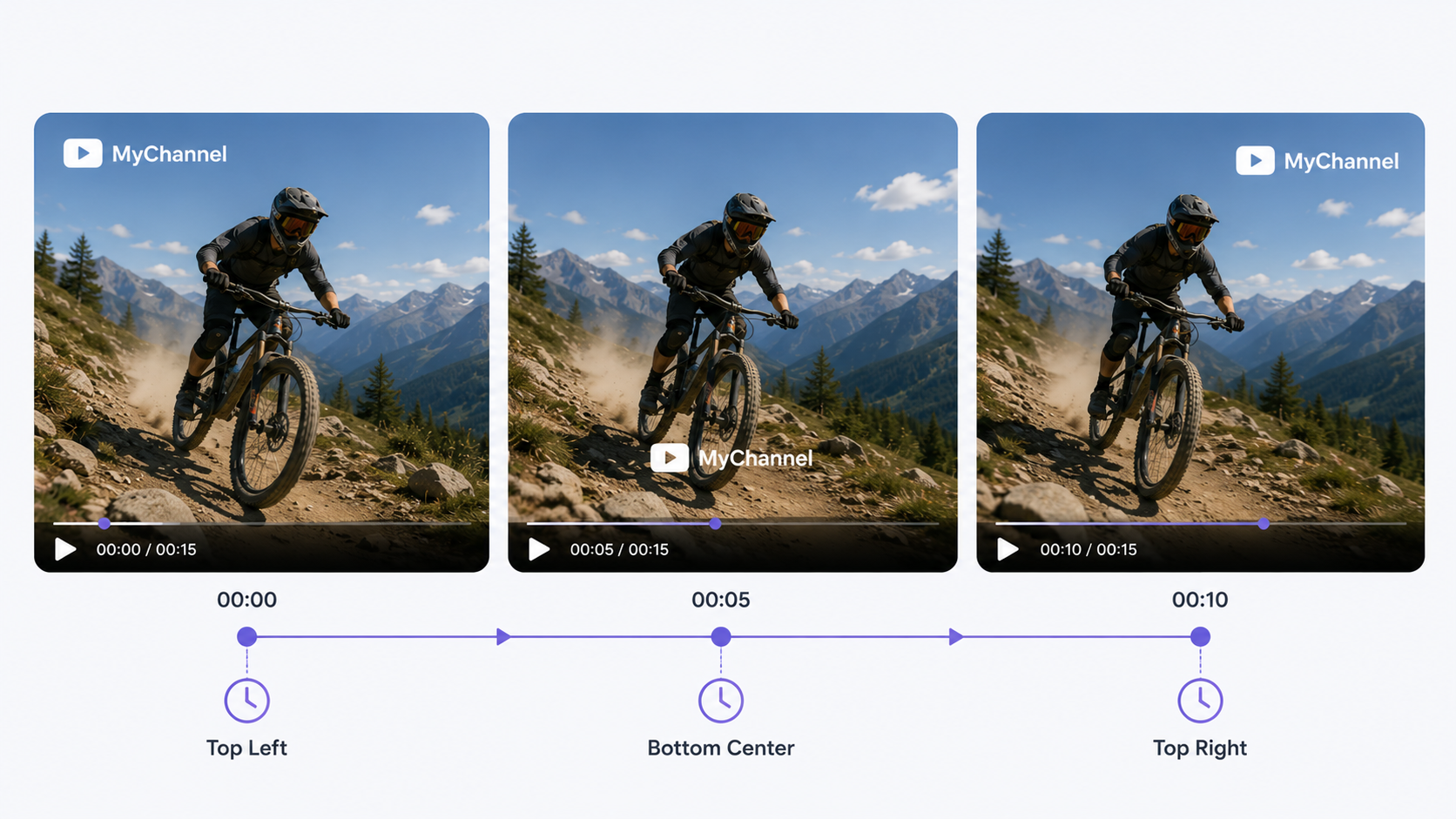
Moving watermarks bounce around, fade in and out, or go off and on at different times while the video plays. Because they keep switching spots, it’s really hard to cover them up with a fixed overlay.
Platform-Generated Watermarks
Some platforms automatically tack on their own logo and the creator’s username when you download a video. The watermark might stay fixed in one place or jump between different corners.
What Are Video Watermarks Used For?
Watermarks support branding, attribution, and content protection. Their most common uses include:
Protecting Video Ownership: A watermark creates a visible connection between the video and its owner, making it harder for someone else to claim the content.
Crediting Creators and Content Sources: A username, logo, or website address helps viewers identify the original creator or publisher. For creators looking to produce highly engaging original content before branding it, mastering how to write a video script is the essential first step.
Preventing Unauthorized Use: A noticeable watermark can discourage people from downloading, reposting, or reselling a video without permission.
Tracking Video Distribution: Businesses can add different watermarks to copies shared with partners, clients, or reviewers to track where each version appears.
Why Do You Need to Remove a Video Watermark?
You might need to freshen up, rework, or tidy up a video you own—or at least one you have the green light to edit. Here is why you might need to strip that watermark out.
Updating an Old Logo or Brand Name
Older videos may still display an outdated logo, website, or company name. After removing it, prepare the replacement logo in an AI image editor so its background, size, and edges are ready before you add it to the video.
Repurposing Videos for Different Platforms
A watermark that worked perfectly for one platform might look totally out of place on another. Scrubbing it off keeps the video looking clean and makes it way easier to shape up for YouTube, ads, slide decks, or other channels. If you prefer to generate brand-new, watermark-free footage from scratch, learning how to make AI videos is an excellent way to streamline your content creation.
Editing Licensed or Client-Provided Footage
Licensed preview clips or videos sent over by clients sometimes come with watermarks you’re actually allowed to wipe out. Just make sure to double-check your contract or client agreement before you go ahead with it.
Removing Distracting Overlays
A large or awkwardly placed watermark can block important details or pull attention away from the main content. A video watermark remover can clear the overlay from footage you are authorized to edit, making the approved video easier to reuse.
Risks and Limits of Removing a Watermark
Watermark removal can involve legal, technical, and privacy concerns. The final result also depends on the watermark’s position and what appears behind it.
Copyright and Permission Risks
Removing a watermark from content you do not own may violate copyright law, licensing terms, or platform rules. Removing the identifying mark does not give you permission to use the video.
Before editing, confirm that you own the footage or have clear permission from the copyright holder.
Video Quality Loss
Watermark removal tools replace the pixels covered by the overlay. When there is not enough visual information to rebuild the area, the result may look blurry, stretched, or softer than the rest of the frame. Using the original or highest-resolution video can help produce a cleaner result.
Difficult Backgrounds and Moving Objects
Plain backgrounds are usually easier to rebuild than faces, detailed textures, changing light, or fast-moving objects. When a watermark covers movement, the edited area may flicker or look distorted between frames.
File Privacy and Data Security
Uploading private, unreleased, or client-owned footage to an unfamiliar online tool can create privacy risks. Some services may store files longer than expected or provide limited information about how uploaded content is handled.
Tips:Review the platform’s privacy policy and file-deletion terms before uploading sensitive videos.
Platform and Export Restrictions
Some tools limit video length, file size, resolution, or supported formats. Free plans may also restrict exports, reduce output quality, or add another watermark to the finished video.
Tips:Check these limits before uploading a large file or starting a time-sensitive project.
How to Remove a Video Watermark with RoboNeo
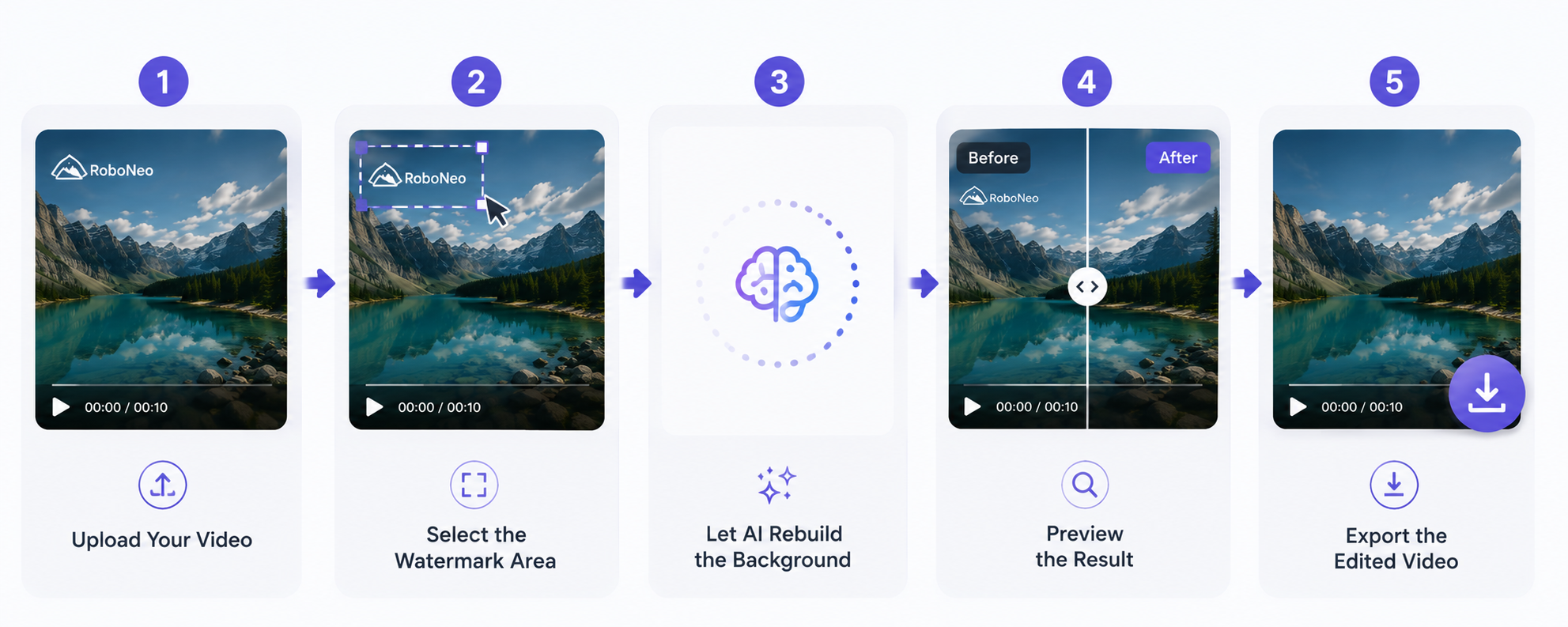
Once you have permission to edit the footage, an AI watermark remover can clean up the video without cropping the frame or covering the overlay. RoboNeo handles the detection and removal automatically, although detailed backgrounds, faces, and fast movement may affect the result.
Step 1. Upload Your Video
Open the watermark removal tool and upload a video you own or are authorized to edit. Use the original or highest-quality version available for better results.
Step 2. Start the Watermark Removal
Choose video watermark removal and begin processing. RoboNeo automatically detects visible logos, text, usernaes, and other watermarks, so you do not need to mark the area manually.
Step3. Let AI Rebuild the Background and Preview the Result
RoboNeo will analyze surrounding pixels and nearby frames to rebuild the watermarked area so color, texture, and motion match the background, then lets you preview the result before export—check for blur, flicker, distortion, or leftover traces, since complex scenes can still show minor artifacts.
FAQ
Does a watermark affect views?
If you keep it small and tuck it away in a corner, a watermark won't really mess with your view count. In fact, it might even help people remember your brand. But if you go with a massive, distracting logo, it's going to block the action, make your video look amateur, and keep people from liking or sharing it.
Is it illegal to remove a watermark from a video?
It really comes down to who actually owns the video and what you're allowed to do with it. If you strip a watermark off someone else’s video, you'll likely run afoul of copyright laws, licensing deals, or platform rules. But if it’s your own footage—or you’ve paid for the rights—you're usually good to take it off, as long as the fine print says so.
What are the pros and cons of watermarking?
Watermarks can protect ownership, credit creators, promote a brand, and discourage unauthorized use. However, they may distract viewers, cover visual details, or make a video harder to reuse on other platforms.
What is a watermark on a video, and what does it look like?
People asking what a watermark on a video looks like may see a corner logo, username, website address, copyright notice, transparent image, or repeating pattern. Some platform watermarks also move between different parts of the screen.
What are common watermark mistakes?
Common mistakes include making the watermark too large, using too much opacity, covering an important subject, or placing it where it can be easily cropped out. Low-resolution logos and inconsistent placement can also make a video look unprofessional.
Can you remove a watermark for free?
Some tools offer free watermark removal, but they may limit video length, file size, processing speed, or export resolution. Others may add their own watermark to the result, so check the free-plan limits and privacy terms before uploading your video.
Is a watermark the same as copyright?
No. A watermark identifies ownership or branding, while copyright is the legal protection behind the content. Removing a watermark does not remove copyright, and using the content without permission may still violate the creator’s rights.
You May Be Interested
How to Remove Instagram Watermark: 3 Methods (2026)
6 Best Ai Character Generator in 2026: Tested & Compared
6 Best AI Video Generators in 2026
Best TikTok Script Generator in 2026